
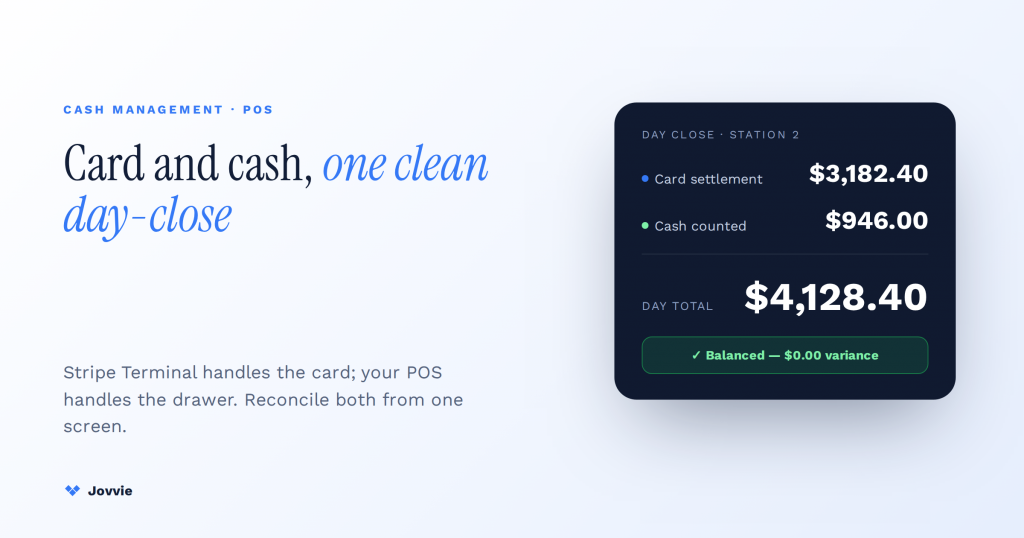
You manage cash drawers with a Stripe Terminal POS at the POS layer, not at the reader — because Stripe Terminal processes cards and contactless only and has no native cash function at all. The POS software running on top of Terminal (like Jovvie) owns everything about cash: opening and closing sessions, counting the till, tracking variance, kicking the drawer, handing off between cashiers, and reconciling counted cash against Stripe’s card settlement at day-close. The mental model that makes the whole thing click: Stripe Terminal handles the card; your POS handles the drawer. They are two separate systems that meet only at the day-close report.
Key Takeaways
- Stripe Terminal has no cash capability — it processes cards, chip, and contactless only; cash lives entirely in your POS software.
- Cash sessions open and close at the POS with a starting float and a counted close.
- Track variance by reconciling the counted drawer against the POS’s expected cash total.
- Clean multi-cashier handoffs either close/open sessions or use per-cashier drawer assignments for accountability.
- A physical cash drawer connects via a printer-driven drawer-kick chain triggered by the POS.
- Day-close combines two sources: Stripe card settlement and the POS cash count.
We have built Stripe Terminal point-of-sale flows for eight years — for retail counters, cafes, pop-ups, and multi-location operations across more than 30 countries — and Jovvie already implements open/close cash sessions and cash-drawer tracking on top of Stripe Terminal. So the workflows below are how a real Stripe-Terminal register handles cash, written from the product, not adapted from a Square or Shopify help doc.
That distinction matters because nearly every guide ranking for cash-drawer management documents Square’s or Shopify’s model, where the POS and the payment processing are one bundled product. A Stripe Terminal stack is architecturally different: the card side (Stripe) and the cash side (your POS) are genuinely separate, which changes how you reconcile at the end of the day. This is the piece that covers cash management for the Stripe-Terminal stack specifically. It’s part of the Stripe Terminal as a POS pillar; if you run WooCommerce, pair it with the Stripe Terminal for WooCommerce implementation guide.
How do you manage cash drawers with a Stripe Terminal POS?
You manage cash drawers entirely through your POS software, because Stripe Terminal itself has no cash-handling capability — it accepts cards, chip, contactless, and mobile wallets, and that’s the full extent of what the reader does. Cash is a POS-layer responsibility from the first dollar of the starting float to the final variance number on the day-close report.
In practice, a shift on a Stripe Terminal register runs like this: a cashier opens a cash session in the POS with a counted starting float; through the shift, card sales run through the Stripe reader while cash sales are recorded in the POS and the physical money goes into the drawer; at the end, the cashier counts the drawer, the POS compares the count to what it expected, and any difference is the variance. Stripe never sees the cash — it only reports the cards — so the POS is the only place the two sides come back together.
The rest of this guide walks each stage: why cash lives at the POS layer, the open/close session model as a numbered procedure, variance tracking, drawer kicks and hardware wiring, multi-cashier handoff, and the combined card-plus-cash day-close that no generic-POS guide covers for this stack.
Can Stripe Terminal accept cash?
No. Stripe Terminal cannot accept, count, or track cash — it is a card-present payment device that handles chip, swipe, contactless taps, and digital wallets, and nothing else. This single fact is the foundation of everything else in this article, so it’s worth stating without hedging.
Stripe’s own documentation frames Terminal as the in-person card-acceptance layer, not a complete point-of-sale system — see Stripe’s explainer on merchant POS systems and its Terminal product page, both of which describe Terminal’s scope as card and contactless acceptance. There is no cash drawer object, no till, no variance report in Stripe Terminal, because that was never its job. Stripe deliberately unbundles payment acceptance from the POS software, which is exactly what lets your in-person and online sales share one Stripe account.
The consequence is simple and it’s the reframe that every competing article misses: if your business takes cash, you need a POS layer on top of Stripe Terminal to manage it. That POS layer is where opening floats, drawer counts, variance, and reconciliation live. Jovvie provides exactly that layer for WooCommerce merchants running Stripe Terminal — so “cash management with a Stripe Terminal POS” is really “cash management in your POS, alongside Stripe-processed cards.” Keep that split in mind and the rest is procedure.
Opening and closing a cash session: the open/close model step by step
The open/close session model is the backbone of cash management: a cashier opens a session with a counted starting float, transacts through the shift, then closes by counting the drawer so the POS can calculate variance. Here is the full procedure for a Stripe Terminal register.
- Open the session with a counted float. At the start of the shift, count the physical cash placed in the drawer — the starting float or “opening balance” (say, $150 in small bills and coins). Enter that number in the POS to open the cash session. This is the baseline every later number is measured against, so count it, don’t assume it.
- Assign the cashier. Tie the session to the person opening it. On a Stripe Terminal register, this is a POS-layer action; the Stripe reader itself is location-keyed but has no concept of “who is on shift.” Cashier assignment is what makes variance accountable later.
- Transact through the shift. Card and wallet payments run through the Stripe Terminal reader and settle to your Stripe account. Cash payments are rung up in the POS — the POS records the sale and the amount tendered, calculates change, and the physical cash goes into the drawer. Card totals and cash totals accumulate on two separate tracks.
- Record paid-ins and paid-outs. Any cash that enters or leaves the drawer for a non-sale reason — a petty-cash payout, a supplier paid in cash, a mid-shift bank drop — is logged in the POS as a paid-in or paid-out so the expected drawer total stays accurate.
- Count the drawer at close. At the end of the shift, physically count the cash in the drawer and enter the counted total to close the session.
- Let the POS calculate expected vs counted. The POS computes what should be in the drawer — starting float, plus cash sales, plus paid-ins, minus paid-outs and change given — and compares it to the counted amount. The difference is the variance.
- Record the close and remove the day’s takings. Bank the cash sales, leave tomorrow’s float, and the session is closed with a permanent record of float, sales, count, and variance.
Note what step 3 makes explicit: on a Stripe Terminal stack the card side and the cash side never touch during the shift. They are reconciled together only at day-close (covered below), which is precisely why a Stripe-Terminal-specific procedure differs from Square’s single-system model.
Tracking cash variance (and reconciling it against Stripe’s card totals)
Cash variance is the difference between what the POS expected in the drawer and what the cashier actually counted, and on a Stripe Terminal register you track it in the POS while separately confirming that card sales match Stripe’s settlement. Two numbers, two sources, one reconciliation.
Variance itself is straightforward math:
Expected drawer = Opening float + Cash sales + Paid-ins − Paid-outs − Change given Variance = Counted drawer − Expected drawer
A positive variance means there’s more cash than expected (an overage); a negative variance means a shortage. Small variances (a dollar or two) are normal rounding and miscounts; consistent or large variances are a training or accountability signal, which is why session-level cashier assignment matters.
Where the Stripe Terminal stack differs is the card side. Because Stripe processes cards independently of your POS, day-close is a two-source reconciliation:
| What you’re reconciling | Source of truth | How to confirm it |
|---|---|---|
| Cash in the drawer | POS cash session (expected vs counted) | Physical drawer count at close |
| Card and wallet sales | Stripe (settlement / balance) | POS card totals should match Stripe’s reported card-present total for the period |
| Combined day total | POS day-close report | Cash reconciliation + Stripe card total = total takings |
The discipline is to verify each side against its own system of record — the drawer count against the POS’s expected cash, and the POS’s card total against Stripe’s settlement figure — and only then sum them. Most generic-POS guides reconcile a single number because their POS is the processor. On a Stripe Terminal register you confirm two, which is more honest bookkeeping: a card discrepancy points to a Stripe/POS sync issue, a cash discrepancy points to the drawer, and you never mask one with the other.
Multi-cashier shift handoff without losing accountability
A clean multi-cashier handoff either closes one cashier’s session and opens a new one, or uses per-cashier drawer assignments so each person is accountable only for their own cash. The goal is that variance always traces to exactly one person.
There are two established patterns, and a good Stripe Terminal POS supports both:
- Full close-and-reopen (shared drawer). When cashier A’s shift ends, they count the drawer and close their session; cashier B counts and opens a fresh session with that count as the new starting float. Each cashier owns a clean, bounded session, and any variance belongs unambiguously to the person who closed it. This is the simplest model and the right default for a single register with sequential shifts.
- Per-cashier drawers / blind counts. For higher-volume operations, each cashier works an assigned drawer (or a “blind” count where the cashier counts without seeing the expected figure, so the count isn’t anchored to the target). Handoff means swapping the physical drawer, not reassigning the register.
Two things stay constant on a Stripe Terminal stack regardless of pattern. First, the Stripe reader is shared and location-keyed — it doesn’t know who’s on shift — so cashier accountability is entirely a POS-layer function; the POS must attribute each cash session (and ideally each transaction) to a named user. Second, card sales continue settling to the one Stripe account throughout, so handoff only ever touches the cash side. Get cashier attribution right in the POS and you get accountable handoffs for free.
Managing cash and card in one WooCommerce register?
Jovvie runs Stripe Terminal card payments alongside cash-drawer tracking, variance, and day-close — all inside WooCommerce.
Start your free trial →Drawer kicks and connecting a physical cash drawer to a Stripe Terminal register
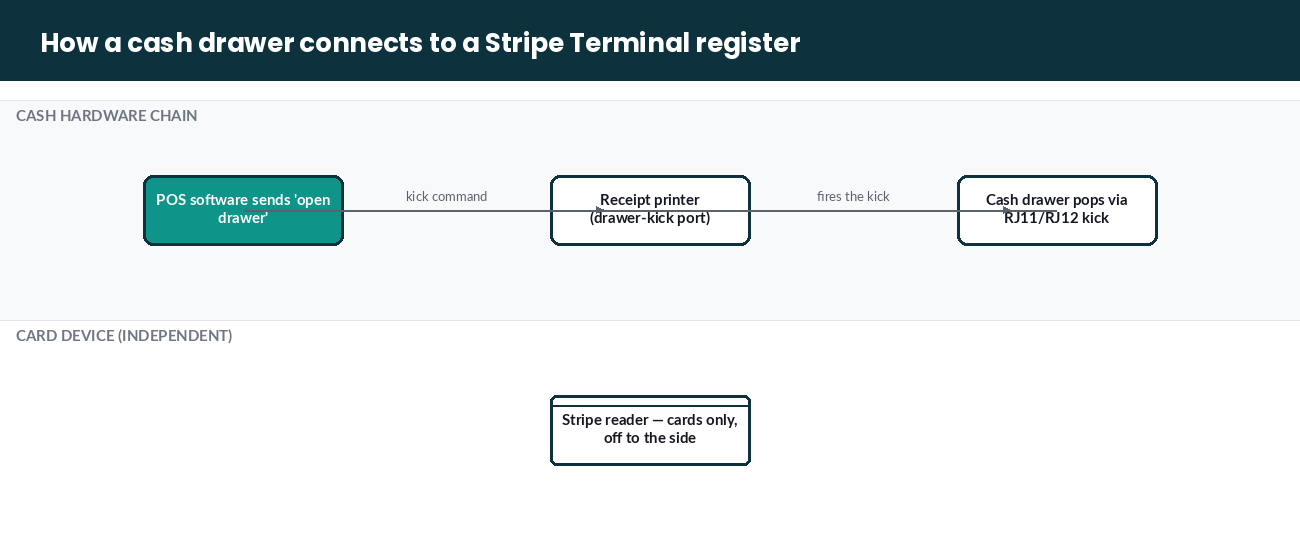
A cash drawer connects to a Stripe Terminal register through the POS and receipt-printer chain — not through the Stripe reader — because the reader has no port or command to open a drawer. The “drawer kick” (the signal that pops the drawer open) is driven by the POS, typically through the receipt printer.
Here’s the wiring reality that trips people up: on an all-in-one POS, the terminal drives the drawer directly. On a Stripe Terminal stack, the Stripe reader is only the card device, so the physical cash drawer is wired to the receipt printer (via the standard RJ11/RJ12 drawer-kick cable), and the POS software sends the “open drawer” command to the printer, which fires the kick. The chain is: POS software → receipt printer → cash drawer. Stripe Terminal sits off to the side, handling cards only.
Practically, that means:
- A “no sale” or drawer-kick function to open the drawer for change-making or corrections lives in the POS, and is a permissioned action worth restricting and logging.
- Your hardware shopping list for a cash-taking Stripe Terminal register is: a Stripe reader (S700 or WisePOS E), a compatible receipt printer with a drawer-kick port, and a cash drawer with a matching kick cable — three components, not one bundled unit.
- The drawer opens on a cash sale (POS triggers the kick at tender) and on an explicit no-sale; a card-only transaction should not pop the drawer, since no cash changes hands.
This separation is a feature once you see it: the card device and the cash hardware are independent, so a reader swap or a printer swap doesn’t disturb the other side.
Day-close reporting: combining card settlement and counted cash
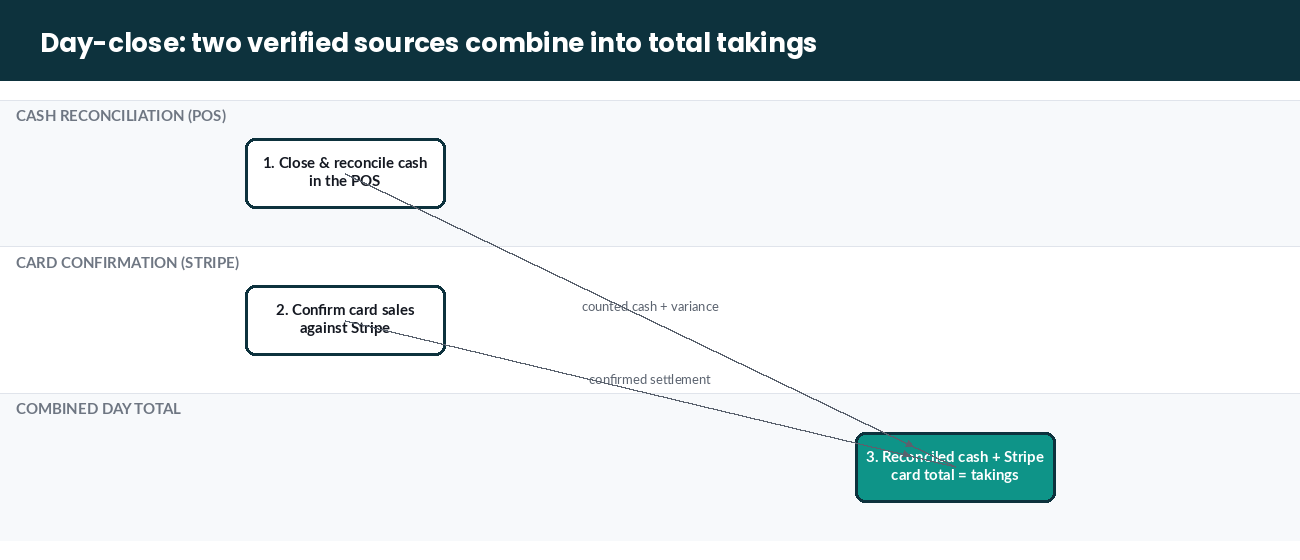
The day-close report on a Stripe Terminal POS combines two independent sources — counted cash reconciled in the POS and card sales settled by Stripe — into one total takings figure, and it’s the only place the card side and cash side of the business meet. This two-source close is the capability no generic-POS guide covers, because their POS is also their processor.
A complete Stripe Terminal day-close does three things in order:
- Close and reconcile cash in the POS. Sum every cashier’s session for the day: opening floats, cash sales, paid-ins/outs, counted drawers, and the resulting variances. This gives you total counted cash and total cash variance.
- Confirm card sales against Stripe. Take the POS’s card-sales total for the day and confirm it against Stripe’s reported card-present total for the same period. A match means your POS and Stripe agree; a mismatch flags a sync or capture issue to investigate before you book the day.
- Combine into total takings. Reconciled cash + confirmed Stripe card total = the day’s takings. Because the two sources are verified independently, the combined figure is trustworthy, and a discrepancy on either side is isolated to that side rather than buried in a single blended number.
For finance and bookkeeping, this two-source model is actually cleaner than a bundled POS’s single report: cash flows are reconciled at the drawer, card flows are reconciled against Stripe’s settlement and payout schedule, and your books reflect the real timing of each (cash is in hand today; card settlement follows Stripe’s payout timeline). Jovvie’s cash-management reporting is built to produce exactly this combined close for a Stripe Terminal register. For the broader picture of how Terminal fits your back office, Stripe’s POS systems for businesses overview is a useful primary-source companion, and Jovvie’s own cash management documentation details the open/close and reconciliation features referenced throughout this guide.
Frequently asked questions
How do you start and end a cash drawer session?
You start a session in your POS by entering a counted opening float and assigning the cashier; you end it by counting the physical drawer and entering the total, at which point the POS compares the count to the expected amount and records the variance. On a Stripe Terminal register this is entirely a POS-layer action — the Stripe reader plays no part in cash sessions.
Can Stripe Terminal accept cash?
No. Stripe Terminal accepts cards, chip, contactless, and mobile wallets only. It has no cash-handling capability, so all cash management — drawers, floats, variance, reconciliation — happens in the POS software running on top of Terminal.
What is a cash variance and how do you track it?
Cash variance is the difference between the cash the POS expected in the drawer (opening float plus cash sales plus paid-ins minus paid-outs and change) and the amount actually counted at close. You track it per session in the POS. Small variances are normal; consistent or large ones signal a training or accountability issue, which is why sessions are tied to named cashiers.
How do you handle a multi-cashier shift handoff?
Either close the outgoing cashier’s session (with a drawer count) and open a fresh session for the incoming cashier, or use per-cashier assigned drawers so each person is accountable only for their own cash. Because the Stripe reader is shared and doesn’t track who’s on shift, cashier accountability is handled entirely by the POS.
What is a “no sale” or drawer kick and when do you use it?
A drawer kick (or “no sale”) is the command that pops the cash drawer open without recording a sale — used for making change or correcting a miscount. On a Stripe Terminal stack the kick is sent by the POS to the receipt printer, which is physically wired to the drawer; the Stripe reader is not involved. It should be a permissioned, logged action.
How do you reconcile cash at the end of the day?
Reconcile in two independent steps, then combine: close and count every cash session in the POS to get counted cash and variance, confirm the POS’s card-sales total against Stripe’s settlement figure for the day, then add reconciled cash to the confirmed Stripe card total for total takings. Verifying each source against its own system of record keeps a cash discrepancy from hiding a card discrepancy, or vice versa.
The bottom line
Cash management on a Stripe Terminal POS comes down to one architectural truth: Stripe Terminal handles the card, your POS handles the drawer, and the two meet only at the day-close. Because the card side and cash side are genuinely separate systems, a Stripe Terminal register gives you a cleaner two-source reconciliation than a bundled POS — provided your POS layer actually implements open/close sessions, variance tracking, cashier accountability, and a combined day-close.
That POS layer is exactly what Jovvie adds on top of Stripe Terminal for WooCommerce merchants: counted floats, cash-drawer tracking, per-cashier sessions, and a day-close that reconciles counted cash against Stripe’s card settlement in one report. If you’re running — or planning — a cash-taking Stripe Terminal register, book a cash management setup call and we’ll map your open/close model, drawer wiring, and reconciliation before your next shift.
Run Stripe Terminal on WooCommerce with Jovvie
Jovvie is the WooCommerce-native point of sale built on Stripe Terminal — take in-person payments, sync every sale to your store, and keep one system of record. Start free, no credit card required.
