
JOVVIE PAY

Enter an amount. Get paid in person.

Jovvie Pay is the simplest way to take a card face to face. No point of sale, no website, no integration. Open the app, type the amount, your customer taps, and the money lands in your own Stripe account.
$0 a month No website needed Tap to Pay, no reader needed Paid to your own Stripe account
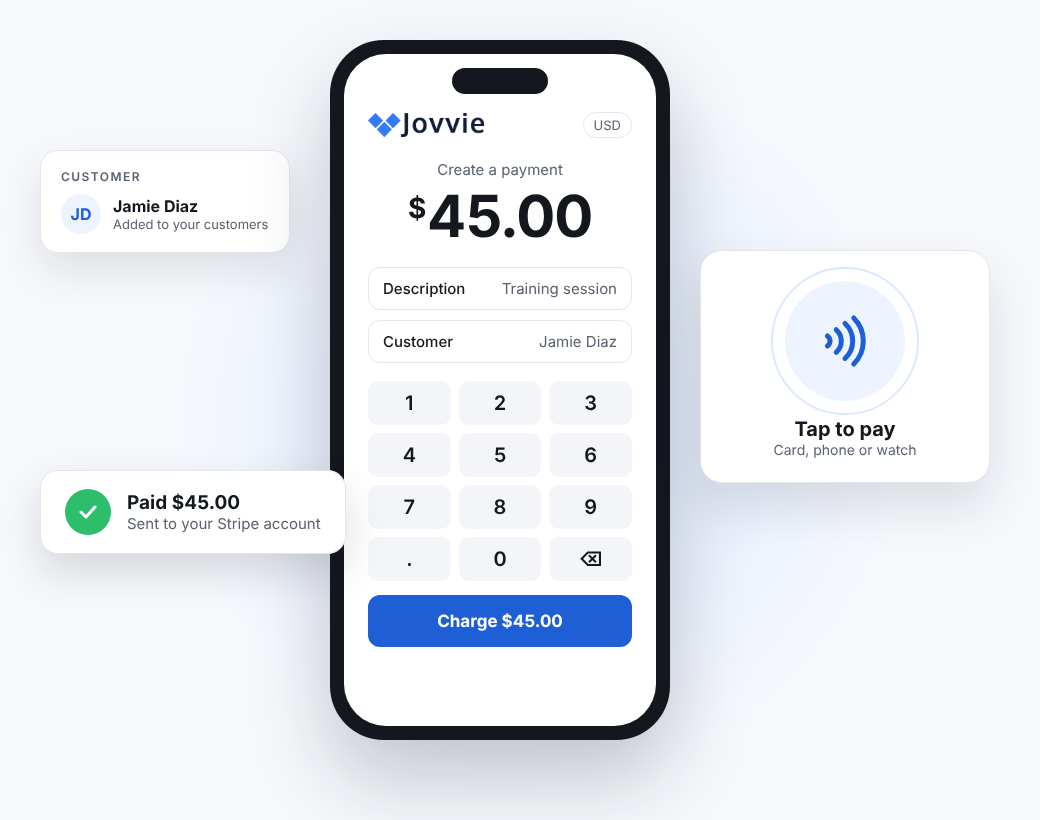
Jovvie Pay on a phone: a $45.00 payment with a description and customer, Tap to pay, and a Paid confirmation
SEE IT IN ACTION

Tap. Pay. Done.

Trade show, farmers market, street fair. Skip the Venmo QR codes and the clunky point of sale. Enter the amount and collect your money on the spot.

Enter the amount, add a customer if you like
Your phone becomes the card reader
Card or phone taps, and you're paid

In the video (49 seconds): at a market stall, a $25 T-shirt is entered in Jovvie Pay with the customer's details. The seller taps In-person payments, Tap to Pay opens on the iPhone, and the customer pays by card and then by phone.

HOW IT WORKS

Type it, tap it, done.

Three steps, and the first one is the only one you do. Most payments take seconds.

Amount
$45.00
Training sessionJamie Diaz
1
Enter the amount
Add a description or a customer if you like. Both are optional.
Tap, insert or swipe
2
Your customer pays
Tap a card, phone or watch on your phone, or use a card reader.
Paid $45.00
In your Stripe account
3
Money in your account
The payment is confirmed on screen and goes to your own Stripe account.
MADE FOR

Anyone who just needs to get paid

Pop-ups and markets
Craft fairs, farmers markets and weekend stalls. Set up in minutes, take cards all day.
Freelancers and services
Trainers, stylists, tutors, consultants and repair pros. Charge at the end of the job.
Nonprofits and events
Take donations and ticket money at the door, a gala or a community day.
Shops without a POS
A quick way to take cards at the counter when you don’t need a catalog or inventory.
WHAT YOU GET

Everything you need. Nothing you don’t.

Tap to Pay on iPhone and Android
Your phone is the card reader. Nothing to buy to get started.
Card readers when you want them
Every Stripe and Verifone reader works, for chip and PIN or a busy counter.
Descriptions on every payment
Note what each payment was for, in any currency your Stripe account supports.
Customers, saved
Attach a payment to a customer and see who paid what.
Digital receipts
Send your customer a digital receipt. No printer to set up.
Runs anywhere
Any web browser, plus apps for Windows, macOS, Linux, iOS and Android.
PEACE OF MIND
Simple to use. Serious about your money.
Secure by design
Card details go from the card straight to Stripe. Jovvie never sees or stores card numbers.
Your money, your account
Payouts go to your own Stripe account on your usual schedule, never through Jovvie.
A Stripe Verified Partner
Built by BizSwoop, a Stripe Partner since 2020 and trusted by 2,000+ businesses.
Nothing to maintain
No plugin to update, no server to run. We host Pay and keep it working.
PRICING

Free to start. You only pay when you get paid.

No monthly fee, no contract and no credit card to sign up. Jovvie charges 1% per payment, plus Stripe's processing rate.

Jovvie Pay
$0 /month + 1% per payment
Tap to Pay on iPhone and Android
Card readers, descriptions and customers
Digital receipts
Multi-currency
No credit card to sign up
Start free
IS PAY RIGHT FOR YOU?

Pick the Jovvie that fits how you sell

Jovvie Pay
You just need to charge an amount. No products, no cart, no setup.
YOU ARE HERE
Jovvie Checkout
You already sell on WooCommerce, Give, Gravity Forms, Event Tickets or your own app, and want in-person payments there.
See Jovvie Checkout →
Jovvie Point of Sale
You want a full register: products, inventory, staff and stations, standalone or with WooCommerce.
See Jovvie Point of Sale →

Questions people ask first

What is Jovvie Pay?

A mini app for taking card payments in person, hosted and run by Jovvie. Open it, enter the amount, and the customer taps, inserts or swipes. The money goes to your own Stripe account.

Do I need a card reader?

No. Tap to Pay turns a supported iPhone or Android phone into the reader. Add any Stripe or Verifone card reader later if you want chip and PIN or a counter setup.

Where can I use it?

In any web browser, or in the Jovvie apps for Windows, macOS, Linux, iOS and Android. Tap to Pay works in the iOS and Android apps.

How much does it cost?

$0 a month. Jovvie charges 1% per payment, plus Stripe's processing rate. No contract and no credit card to sign up.

Where does the money go?

To your own Stripe account, with payouts on your usual Stripe schedule. Jovvie never holds your money.

Do I need a website or WordPress?

No. Jovvie Pay is hosted by Jovvie, so there is no website, plugin or server to set up. Just open it and take a payment.

Can I add a description or a customer?

Yes. Add a note about what the payment is for and attach it to a customer, so you can see who paid and why.

Is it secure?

Yes. Card details go straight to Stripe. Jovvie never sees or stores card numbers, and is a Stripe Verified Partner.

Does it send receipts?

Yes, digital receipts. Printed receipts need a receipt printer and a register, which Jovvie Point of Sale includes.

What if I need products or inventory?

Then Jovvie Point of Sale is the better fit. If you already sell on WooCommerce, Give or another app, see Jovvie Checkout.

Your next payment could take ten seconds.

Sign up free, connect Stripe and take your first payment today.