
Yes — you can renew a WooCommerce Subscription at the register: Jovvie processes the renewal as a Stripe Terminal card-present charge and records it against the correct WooCommerce Subscriptions renewal order, and you can also use the same tap to save the customer’s card for fully automatic future renewals, even though the card was originally captured in person. WooCommerce Subscriptions was built assuming a card typed into an online checkout; Stripe Terminal was built for a card tapped at a counter. Neither product natively bridges the gap on its own — Jovvie is the layer that connects them, and this is the setup no other WooCommerce guide walks through.
Key Takeaways
- Yes — you can renew a WooCommerce Subscription at the register: Jovvie processes it as a Stripe Terminal card-present charge on the existing renewal order.
- WooCommerce’s native renewals were not built for a card reader — bridging the gap is configuration, not custom architecture.
- Two paths: charge the renewal in person, or save a card on file via SetupIntent for future automatic renewals.
- Failed automatic renewals behave normally — the subscription goes on-hold and retries; a fresh in-person charge restores it.
- Plan for the edge cases: failed renewals, mid-cycle proration, and manual-vs-automatic tax differences.
- One customer record, one subscription — whether they renew online or at the counter.
We have run WooCommerce point-of-sale on Stripe Terminal for eight years, and subscription businesses running a physical location — gyms with membership dues, meal-kit and CSA pickup boxes, studio class packages, faith and membership organizations collecting recurring dues — ask us the same question in different words: “my subscriber is standing at the counter right now, how do I take this payment without breaking their subscription record?” This guide covers both renewal paths Jovvie supports — a one-time in-person renewal charge, and capturing a reusable card at the counter for ongoing automatic billing — plus the configuration, the customer experience, and the edge cases (failed payments, prorations, tax) that trip up a DIY integration attempt.
This is a cluster piece in the WooCommerce pillar. For the full picture of running a register on WooCommerce, start with the Stripe Terminal for WooCommerce complete implementation guide. For related in-person commerce features on subscription-adjacent products, see Stripe Terminal + WooCommerce Gift Cards at the Register and Stripe Terminal + WooCommerce Points & Rewards.
Can I renew a WooCommerce Subscription at the register?
Yes. A WooCommerce Subscription can be renewed at the register by processing the renewal amount as a Stripe Terminal card-present charge through a POS layer like Jovvie, which applies the payment to the subscription’s existing renewal order instead of creating an unrelated one-off sale.
WooCommerce Subscriptions natively supports two renewal methods, both documented in WooCommerce’s own subscription renewal process guide: automatic renewal, where a stored payment method is charged without the customer’s involvement, and manual renewal, where the subscription goes on-hold and the customer logs in to pay through the normal checkout flow. Neither path was designed with a card reader in mind — automatic renewal assumes an online-capable saved payment method, and manual renewal assumes the customer completes an actual web checkout. An in-person Stripe Terminal tap is neither of those by default. Jovvie closes the gap by giving the manual-renewal order a checkout equivalent at the counter: when a subscriber’s renewal order is pending, Jovvie looks it up, charges the exact amount due through the connected Stripe Terminal reader, and marks the order paid the same way WooCommerce’s own checkout would — which reactivates the subscription and advances the next payment date automatically.
How does the architecture work — Subscriptions, Jovvie, and Stripe Terminal together?
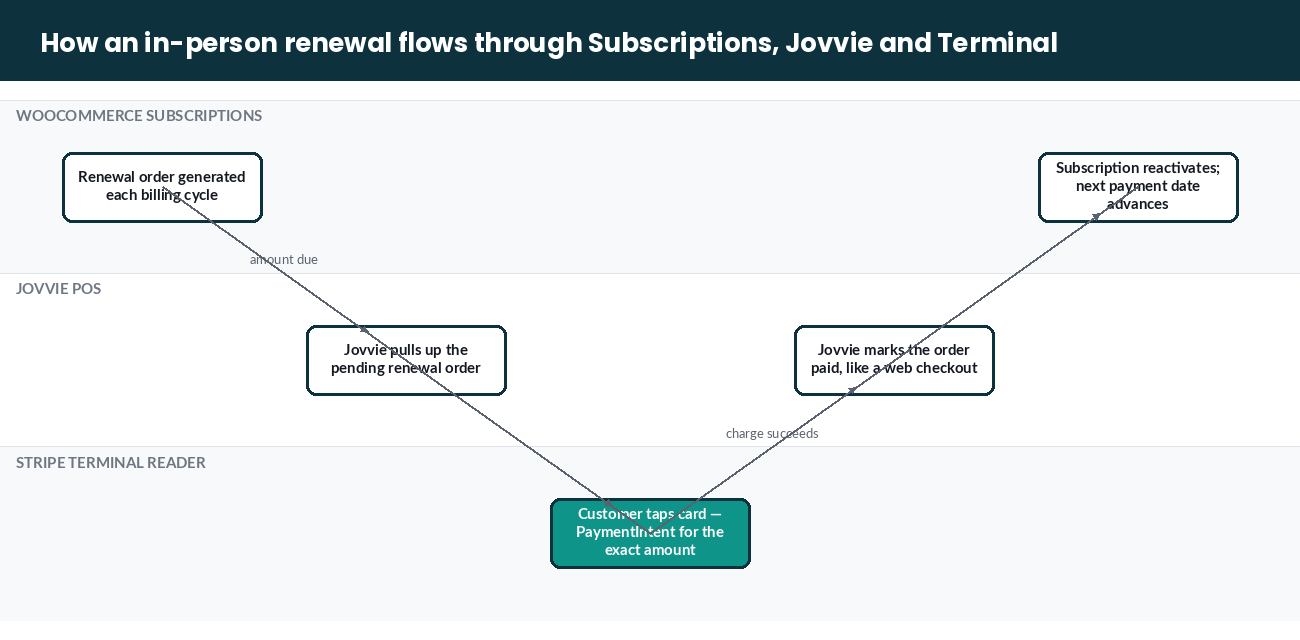
The architecture works by keeping WooCommerce Subscriptions as the system of record for billing dates and terms, while Jovvie acts as the in-person checkout that satisfies a renewal order using a Stripe Terminal PaymentIntent instead of an online card form.
Three components, three jobs:
- WooCommerce Subscriptions owns the subscription lifecycle: next-payment date, status (active, on-hold, cancelled), line items, and — critically — the renewal order it generates each billing cycle. This is unchanged by anything Stripe Terminal does; Subscriptions has no awareness of card-present payments at all.
- Stripe Terminal owns the card-present payment primitive: connecting to the reader, creating a PaymentIntent, and capturing funds from a tapped, inserted, or swiped card. It has no awareness of WooCommerce orders or subscriptions.
- Jovvie is the layer that reads the pending renewal order’s amount, drives the Terminal reader to collect that exact amount, and — on a successful charge — completes the WooCommerce order the same way a paid checkout would, which is what triggers Subscriptions to reactivate the subscription and recalculate the next renewal date.
Stripe Terminal supports this bridge two ways, and which one you use depends on whether you want a one-time in-person payment or a saved card for future automatic renewals:
- Path 1 — In-person renewal charge (manual renewal model). The subscription stays on WooCommerce’s standard manual-renewal setting. When the subscriber arrives to renew, Jovvie pulls up their pending or upcoming renewal order, taps their card on the Terminal reader for that exact amount, and marks the order paid. This is the simplest path and requires no card storage at all — the customer pays fresh each cycle, in person, the way they would for any other counter sale.
- Path 2 — Card-on-file captured in person, billed automatically online (SetupIntent model). Stripe Terminal supports saving a card at the point of sale for future off-session use through the Setup Intents API: Jovvie creates a SetupIntent, the customer taps or inserts their card on the reader, and a successful setup returns a reusable
card_present.generated_cardpayment method — the same underlying mechanism Stripe uses to let you charge that card online later, without the customer present. Jovvie attaches that generated payment method to the customer’s WooCommerce Subscription as its stored payment token, switches the subscription to automatic renewal, and every subsequent cycle bills off-session with no counter visit required. This is the pattern almost no competing content documents: the card is captured in person, but the subscription behaves exactly like any other automatically renewing WooCommerce subscription from that point forward. Per Stripe’s documentation, the Setup Intents API for saving card-present details is available in Australia, Canada, Ireland, Singapore, the UK, and the US, and works with BBPOS readers and the Stripe Reader M2.
In-person renewal vs. card-on-file: which should you use?
| Path 1: In-person renewal charge | Path 2: Card-on-file (SetupIntent) | |
|---|---|---|
| Renewal method in WooCommerce | Manual | Automatic |
| Customer action required each cycle | Must visit and tap card each renewal | None after initial capture |
| Card storage required | No | Yes — reusable card_present.generated_card |
| Best for | Members who visit regularly anyway (gym check-ins, weekly pickup) | Members who shouldn’t need to return just to pay (dues, box subscriptions with delivery) |
| Failure/decline handling | Retap immediately at the counter | Standard WooCommerce Subscriptions automatic-retry flow (see edge cases below) |
| Setup complexity | Low — no special configuration beyond enabling manual renewals | Moderate — requires the SetupIntent capture step at first visit |
| Stripe reader compatibility | Any Terminal reader | BBPOS readers and Stripe Reader M2 (per Stripe’s Setup Intents documentation) |
Most subscription businesses running a physical location use both, split by customer type: new sign-ups captured in person default to Path 2 so they never have to think about renewal again, while any customer with a manual-renewal subscription (existing customers, or ones who chose pay-as-you-go on purpose) uses Path 1 whenever they happen to be on-site.
How do you configure Stripe Terminal + WooCommerce Subscriptions for in-person renewals?
You configure this by enabling manual renewals in WooCommerce Subscriptions’ settings, connecting your Stripe Terminal reader to Jovvie as you would for any in-person sale, and then choosing Path 1 or Path 2 per subscription product or per customer at the point of sale.
- Enable manual renewals. In WooCommerce → Subscriptions → Settings, turn on Accept Manual Renewals (off by default, per WooCommerce’s own documentation). This is required for Path 1 regardless of whether you also use Path 2 for other customers.
- Confirm your Stripe Terminal reader is connected to Jovvie. If you already run in-person sales through Jovvie, this step is already done — subscription renewals use the same reader connection as every other counter transaction.
- For Path 1 (in-person renewal charge): at checkout in Jovvie, search the customer’s account, locate their pending or upcoming subscription renewal order, and process the exact renewal amount as a standard Terminal charge. Jovvie applies the payment to that order and lets WooCommerce Subscriptions handle reactivation and the next-payment-date calculation natively.
- For Path 2 (card-on-file): at the customer’s first in-person visit — typically initial sign-up — use Jovvie’s save-card flow, which creates the SetupIntent and captures the card via the Terminal reader. Attach the resulting payment method to the subscription and confirm the subscription is set to automatic renewal.
- Test both paths with a low-dollar subscription product before rolling out broadly, following WooCommerce’s guidance on testing the renewal process, and confirm the order note, customer email, and next-payment date all update as expected.
Taking subscription renewals at the counter?
Jovvie runs WooCommerce Subscriptions renewals on Stripe Terminal, so in-person and automatic billing stay on the same subscription.
Start your free trial →What does the customer experience look like?
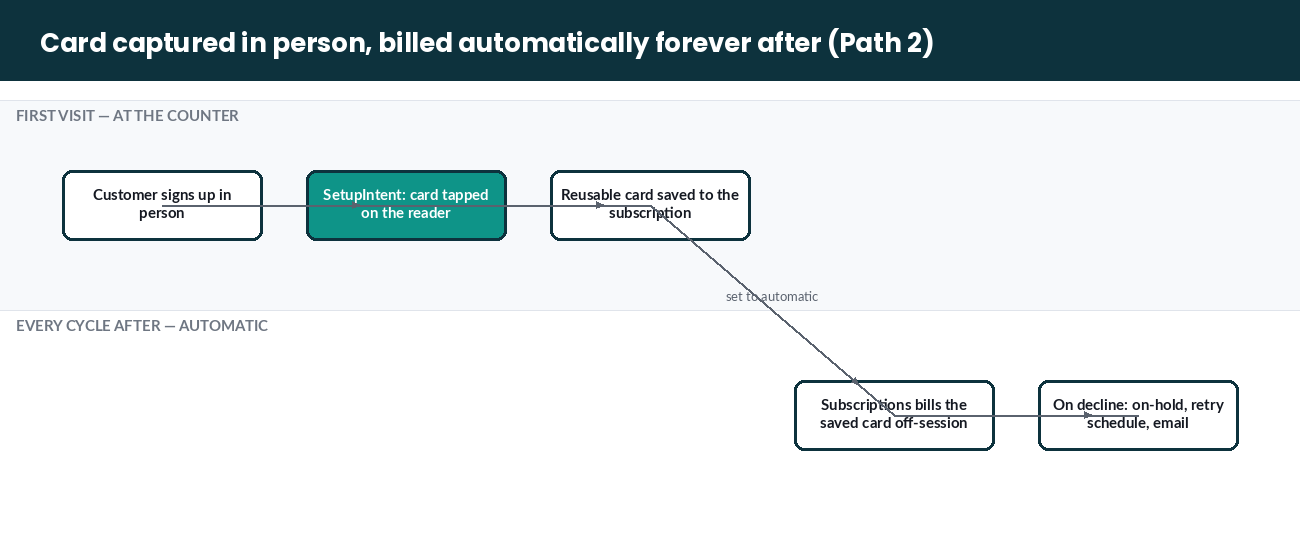
The customer experience differs by path: a Path 1 customer has a short, visible checkout moment each renewal, while a Path 2 customer taps their card once and never sees the renewal process again.
- Path 1 walk-through — a gym member renewing monthly dues in person. The member checks in for a class. Staff pulls up their account in Jovvie, sees the monthly dues renewal order is due, and taps the member’s card on the reader for the exact amount. The member gets a receipt; WooCommerce marks the renewal order paid and Subscriptions pushes the next billing date out one month. No online checkout, no invoice email required (though the Customer Renewal Invoice email can still be enabled as a reminder for members who haven’t renewed by their due date).
- Path 2 walk-through — a CSA box subscriber signing up at the farm stand. A customer signs up for a weekly produce box in person. Jovvie captures their card via the Terminal reader, using the SetupIntent flow to save it, and sets the subscription to automatic renewal. Every following week, WooCommerce Subscriptions charges the saved card automatically — the customer never needs to visit again just to pay, only to pick up their box (or not, if delivery is offered). This mirrors the experience of signing up online with a saved card, except the card was captured at a farm stand instead of a web form.
In both paths, the standard WooCommerce Subscriptions customer-facing tools remain available: subscribers can still log into My Account → Subscriptions to view billing history, update their address, or change their payment method going forward — the in-person capture only affects how the card was collected, not how the subscription is managed afterward.
What are the edge cases — failed renewals, prorations, and tax?
The edge cases that matter most are automatic-renewal failures on a Path 2 card, mid-cycle proration when a subscriber changes plans in person, and the tax-calculation difference between manual and automatic renewals.
- Failed automatic renewals (Path 2). If a card saved via Terminal SetupIntent later fails — expired, insufficient funds, bank decline — WooCommerce Subscriptions handles it exactly as it would any other automatic-renewal failure: the subscription goes on-hold, and if you’ve enabled the automatic retry system, Subscriptions retries on a defined schedule and emails the customer. Nothing about the card having been captured in person changes this behavior — once saved, it’s a standard reusable Stripe payment method to WooCommerce. The practical fix path for a subscriber who’s back on-site: process a fresh Path 1 in-person charge for the failed renewal order, which both restores the subscription and gives you the option to save a new card via SetupIntent if the old one is expiring.
- Prorations and mid-cycle changes. If a subscriber upgrades or downgrades their plan in person — moving from a monthly to a quarterly membership, for instance — calculate the correct prorated or new renewal amount in Jovvie before charging the reader, since Stripe Terminal has no awareness of WooCommerce Subscriptions’ proration logic; Jovvie needs to compute the right number and pass it to the PaymentIntent, the same way it would for any adjusted counter sale.
- Tax calculation differs by renewal method. Per WooCommerce’s documentation, automatic renewals lock in the tax rate calculated at initial sign-up for every future charge, while manual renewals recalculate tax at the time each payment is processed — because a manual renewal runs through the standard checkout flow. This means a Path 1 in-person renewal will recalculate tax at the current rate (correct if your tax jurisdiction has changed since sign-up), while a Path 2 automatically billed renewal will keep charging the sign-up-time rate unless you manually update the subscription’s recurring tax line items. If your business operates across jurisdictions with rate changes, factor this into which path you default new sign-ups into.
- Switching a subscription between manual and automatic. A customer can move from Path 1 to Path 2 (or back) at any time — capturing a new card via SetupIntent switches them to automatic renewal going forward; disabling automatic payment or having their saved method fail without replacement returns them to manual. Neither switch affects past renewal history or the subscription’s term.
Frequently asked questions
Can I renew a WooCommerce Subscription at the register?
Yes. With Jovvie connected to a Stripe Terminal reader, you can charge the exact amount of a pending WooCommerce Subscriptions renewal order in person and have it marked paid, reactivating the subscription the same way an online checkout payment would.
Does Stripe Terminal support saving a card for future automatic subscription renewals?
Yes. Stripe Terminal supports saving payment details captured at the point of sale for future off-session use via the Setup Intents API, available on BBPOS readers and the Stripe Reader M2, in Australia, Canada, Ireland, Singapore, the UK, and the US as of this writing. Jovvie uses this to attach an in-person-captured card to a WooCommerce Subscription for ongoing automatic billing.
What happens if an automatically renewing subscription’s saved card fails?
WooCommerce Subscriptions puts the subscription on-hold and, if enabled, runs its standard automatic retry schedule with customer email notifications — identical to how it handles any other automatic-renewal payment failure, regardless of whether the card was originally saved online or in person.
Do I need a special Stripe Terminal reader for this?
No special reader is required for in-person renewal charges (Path 1) — any connected Terminal reader works. For capturing a card for future automatic renewals (Path 2), Stripe’s Setup Intents API for card-present details is compatible with BBPOS readers and the Stripe Reader M2.
Does an in-person renewal charge the same tax rate as the original sign-up?
Not necessarily. Manual renewals — which is what a Path 1 in-person charge is — recalculate tax at the time of payment, while automatic renewals lock in the tax rate from initial sign-up. If your tax rate has changed since a customer signed up, an in-person renewal will reflect the current rate.
Can a customer switch between paying in person and automatic billing?
Yes. Capturing a new card via the Terminal SetupIntent flow moves a subscription to automatic renewal; removing or letting a saved payment method lapse without replacement returns it to manual renewal, payable at the register or online.
The bottom line for subscription businesses with a physical location
WooCommerce Subscriptions and Stripe Terminal were not built to talk to each other directly, but the gap is a configuration problem, not an architectural dead end — Jovvie bridges it with two supported paths: charge a pending renewal order in person, or capture a card in person and let it renew automatically forever after. Most subscription businesses with foot traffic end up using both, matched to how each customer actually behaves.
If you’re running (or planning) a subscription product alongside a physical counter — membership dues, box pickups, class packages — we can walk through which renewal path fits which part of your customer base before you configure anything. Book a subscriptions setup call with the Jovvie team and we’ll map it to your specific billing cycles.
Primary sources: WooCommerce Subscriptions · Subscription Renewal Process documentation · Failed Recurring Payment Retry System · Save and collect payment details for future use with Stripe Terminal · Stripe Terminal documentation
Related reading: Stripe Terminal for WooCommerce: The Complete Implementation Guide · Stripe Terminal + WooCommerce Gift Cards at the Register · Stripe Terminal + WooCommerce Points & Rewards
Run Stripe Terminal on WooCommerce with Jovvie
Jovvie is the WooCommerce-native point of sale built on Stripe Terminal — take in-person payments, sync every sale to your store, and keep one system of record. Start free, no credit card required.
