
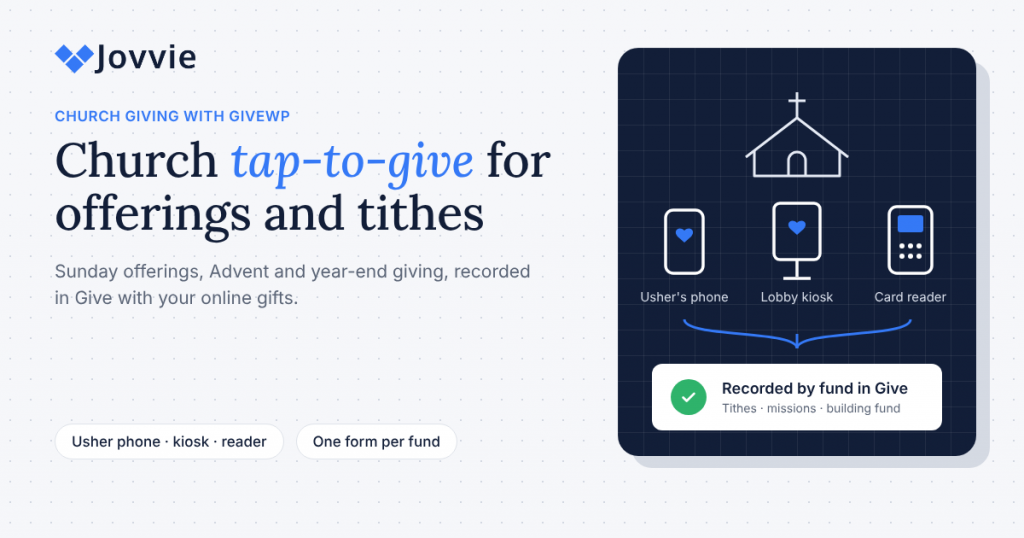
A church can accept tap-to-give donations on its WordPress site by adding Tap To Donate for Give by Jovvie to its Give forms. Members tap a card, phone or watch on an usher’s phone or a lobby reader, and each gift is recorded in Give (formerly GiveWP) next to the church’s online giving, on the same donor record.
Church tap to give has become a real expectation: fewer people carry cash or checkbooks, and the offering plate still comes around. This guide explains what “tap to give” means (it isn’t always what the ads suggest), which giving moments suit it, how to route gifts to the right fund, how to choose between a lobby kiosk, an usher’s phone and a card reader, and how in-person gifts fit recurring tithes and year-end statements. It also compares the cost honestly with church giving platforms such as Tithely, Pushpay and Subsplash. If you’re setting up before Advent, GivingTuesday on Tuesday, December 1, 2026 is a useful first deadline.
Key Takeaways
- Real tap-to-give is a card-present payment. A card or phone tapped on a reader or an usher’s phone is processed in person, which is different from an NFC sticker that opens a web form on the member’s own phone.
- Your existing Give forms do the work. Jovvie adds Tap to Pay, Stripe card readers and kiosk mode to the Give forms your church already uses, so there’s no second giving platform or member list.
- Separate forms keep funds clean. A Give form for each fund (tithes and offerings, missions, building fund, Christmas offering) is the simplest way to know where every tapped gift belongs.
- Members can start a recurring tithe in person. Monthly, quarterly and annual gifts are supported on in-person transactions.
- There’s no monthly fee for the software. The plugin and Jovvie account are free; a platform fee of 0.5% to 2% applies to in-person gifts only, by volume, plus Stripe’s processing rate.
- Every device needs a connection. There’s no offline mode, so check the sanctuary’s Wi-Fi or mobile signal before Sunday.
How can a church accept tap-to-give donations with its WordPress site?
A church accepts tap-to-give donations with its WordPress site by connecting a free Jovvie account to Give, then taking gifts on a phone, a Stripe card reader or a lobby kiosk that runs its Give form. The WordPress.org listing for Tap To Donate for Give by Jovvie lists three ways to take the card:
- Tap to Pay on iPhone and Android. An usher or greeter’s phone becomes the reader, with no hardware to buy.
- Bluetooth readers (Stripe Reader M2 and BBPOS WisePad 3), paired in the Jovvie app, for welcome tables and members who prefer to insert a chip card.
- Wi-Fi or Ethernet readers (Stripe Reader S700 and BBPOS WisePOS E), registered with a one-time code, for a lobby kiosk or the church office.
Gifts settle to the church’s own Stripe account, and in-person and online donations appear together in Give and in Stripe. Your online giving page, forms and receipts don’t change. For the full overview, see our complete guide to accepting in-person donations with GiveWP.
Is “tap to give” an NFC sticker or a real card tap, and why does it matter?
Much of what’s sold as church “tap to give” is an NFC tag or sticker: the member taps their own phone on it, a web page opens, and they finish the gift online. A real card tap happens on a payment device, and the gift is complete the moment the card or phone touches it. Both have a place, but they aren’t the same thing.
| NFC tag or sticker | Card-present tap (Jovvie) | |
|---|---|---|
| What the member taps | Their own phone, on a tag in a pew or on a sign | Their card, phone or watch, on an usher’s phone, a reader or a kiosk |
| What happens next | A giving web page opens; the member types or uses a wallet to finish | The payment is authorized on the spot |
| Who it works for | Members with a smartphone and the patience to complete a form | Anyone with a contactless card or digital wallet |
| Payment type | Online (card-not-present) | In person (card-present) |
| U.S. Stripe processing rate | 2.9% + 30¢ on domestic cards | 2.7% + 5¢ on domestic cards (Stripe pricing) |
| Hardware | A tag or sticker | A phone you already have, or a Stripe reader |
The rate difference matters most for small gifts. The fixed 30¢ online fee is 3% of a $10 offering by itself; the in-person fixed fee is 5¢. Tap to Pay adds $0.10 per authorization under Stripe’s pricing, and Jovvie’s platform fee applies to in-person gifts.
The other difference is people. A tag only helps members who have their phone out and are comfortable finishing a form during worship. A card tap works for the visitor with a contactless debit card and the longtime member with an Apple Watch alike. Many churches keep a QR code or tag as a backup and use card-present tap for the offering itself.
Which giving moments suit church tap-to-give?
Tap-to-give suits any moment when members are physically present and ready to give but aren’t carrying cash. Plan by moment, not by device:
| Giving moment | Typical setup | Give form to use | Notes |
|---|---|---|---|
| Sunday offering | Ushers with Tap to Pay phones, plus a lobby kiosk | Tithes and offerings | Brief ushers on a short, quiet script |
| Advent and Christmas Eve | Extra ushers and a second kiosk near the exits | Christmas offering | Visitors give once; keep the form to one screen |
| Year-end giving (through December 31) | Lobby kiosk, welcome table | Year-end or general fund | Remind members that gifts count for the calendar year in which they’re made |
| Building fund or capital campaign | Staffed table after services | Building fund | A good place to start pledges as monthly gifts |
| Missions Sunday, VBS, youth trips | Table or Tap to Pay at the event | Missions or event fund | One form per appeal keeps reporting simple |
| Concerts, festivals, community meals | Tap to Pay or a Bluetooth reader | Event fund | Check signal outdoors and in fellowship halls |
On GivingTuesday (December 1), many churches run a midweek appeal or a special Sunday the weekend before. Our GivingTuesday in-person donations playbook covers the countdown, and our event fundraising guide for GiveWP covers festivals, concerts and dinners.
How do members choose a fund (tithe, missions, building) when they tap?
The most reliable way is to create one Give form per fund and have each device or usher open the right form before the gift. An in-person gift is recorded on the Give form it was taken on, so the form tells you the fund.
A simple set of forms for most churches:
- Tithes and offerings (the default form for Sunday, with a recurring option).
- Missions.
- Building fund or the current capital campaign.
- Christmas offering (seasonal; reuse it each year).
- Benevolence or a pastor’s discretionary fund, if your church uses one.
Each form can sit in its own Give campaign so your treasurer can report by fund without re-sorting gifts.
If your church uses Give’s Funds & Designations add-on (part of Give’s Elite plan, per Liquid Web’s Give plans page) to offer a fund dropdown on a single form, test that form in Jovvie’s Test Mode before Sunday. Confirm the designation appears on the in-person payment screen and that test gifts record against the right fund. The separate-forms approach works without that add-on and is easier for ushers.
Lobby kiosk, usher’s phone or card reader: which fits your church?
Use a lobby kiosk for self-serve giving before and after services, ushers’ phones with Tap to Pay for the offering itself, and a card reader where members want to insert a chip card or where you need a fixed station. Most churches use two of the three.
| Setup | Best for | What you need | Watch out for |
|---|---|---|---|
| Lobby or foyer kiosk | Before and after services, midweek visitors, the church office | A tablet on a locking stand, a Stripe Reader S700, power and Wi-Fi | Place it within sight of staff; it can’t take gifts if Wi-Fi drops |
| Usher’s phone (Tap to Pay) | The offering, Christmas Eve, outdoor services | A supported iPhone or NFC Android phone and the Jovvie app | Tap to Pay can’t read an inserted chip card |
| Bluetooth reader at a table | Welcome table, building-fund table, events | A Stripe Reader M2 (U.S.) or BBPOS WisePad 3, paired to a phone or tablet | Charge it the night before |
| Countertop reader | Church office, bookstore, café | A Stripe Reader S700 or BBPOS WisePOS E on Wi-Fi or Ethernet | Register it with the one-time code before first use |
Kiosk mode is the right choice for an unattended lobby: the Give form resets after each donation so the next member can step up, and it works with page caching and hosts that disable PHP sessions. Our GiveWP donation kiosk guide covers stands, signage and setup, and our earlier article on best practices for church giving kiosks covers placement and how to introduce the kiosk to your congregation. Stripe Terminal readers are ordered from your church’s own Stripe account; the Stripe Terminal documentation lists each reader’s specifications.
Be ready for GivingTuesday (December 1) and Advent. Add tap-to-give to the Give forms your church already uses: free, about five minutes for the software, and gifts land in the same donor records as online giving.
How do you set up church tap-to-give with GiveWP?
Set up church tap-to-give in Test Mode first, run a few practice gifts with your ushers, then switch to Live Mode before the service. The software takes about five minutes; a kiosk stand and usher training take longer. The Jovvie setup documentation has every screen.
- Install the plugin. In WordPress, go to Plugins › Add New Plugin, search for “Tap To Donate for Give by Jovvie”, install and activate it.
- Connect Jovvie Payments. Go to Give › Settings › Payment Gateways › Jovvie Payments and connect your Stripe account through a free Jovvie account.
- Create a location for the church building. Stripe requires every reader to belong to a location.
- Add your devices. Register Wi-Fi readers (S700, WisePOS E) with the one-time code shown on the reader; pair Bluetooth readers and set up Tap to Pay in the Jovvie app.
- Create or tidy your fund forms. One Give form per fund, each with suggested amounts, a custom amount, name and email, and a recurring option on the tithes form.
- Enable the Jovvie gateway on those forms. Your online gateways stay as they are.
- Test with Stripe test cards in Test Mode. Confirm each test gift appears in Give on the right form, and that receipts go out as expected.
- Train ushers in ten minutes. Open the right form, hand over the phone or hold it out, wait for the confirmation, and say thank you. Practice once with a test card.
- Switch to Live Mode before the service and check the connection in the sanctuary and lobby.
If you’d like a step-by-step walkthrough with screenshots, our GiveWP Tap to Donate setup guide goes screen by screen.
Can members start a recurring tithe in person?
Yes. Members can start a monthly, quarterly or annual gift in person, according to the WordPress.org listing. The recurring options on a Give form come from Give’s Recurring Donations add-on, which is included in Give’s Pro and Elite plans; if your church already offers recurring giving online, you most likely have it.
Recurring tithes are where in-person giving does the most good for a church budget. A member who taps once on Christmas Eve gives once; a member who starts a monthly tithe at the welcome table gives all year. A few practical points:
- Put the recurring option on the tithes and offerings form, not on seasonal forms.
- Ask at a staffed table, not at an unattended kiosk. A greeter can explain the gift in a sentence: “You can set this up monthly, and you’ll get a receipt each time.”
- Use the building fund table for pledges spread over a year as monthly gifts.
- Make sure members leave an email, so receipts and their year-end statement reach them.
Our guide to recurring donations in person has scripts and form settings.
Do in-person gifts appear on annual giving statements?
In-person gifts taken through Jovvie are recorded as Give donations with the donor’s record, alongside online gifts, so they’re part of the giving history your statements draw on. Confirm the specific statement tool before you rely on it in January.
Many churches send members a year-end giving statement, and the IRS requires a written acknowledgment for any single contribution of $250 or more, which can state that only intangible religious benefits were provided (IRS Publication 1771). Give’s Annual Receipts add-on, included in the Pro and Elite plans, lets donors view and download annual receipt PDFs from their donation history (Give Annual Receipts documentation). Annual Receipts works with Jovvie: in-person gifts are recorded as Give donations, so they show up in the donor’s history and annual receipt next to their online gifts. A quick check before year-end:
- Run a test in-person gift in Test Mode for a test donor who also has an online gift.
- Check that both appear in that donor’s history and annual receipt.
- If anything looks off, contact Jovvie support before statements go out.
The one thing tap-to-give can’t do is attach a gift to a member who doesn’t leave their details. Anonymous taps at the offering are still recorded, but they can’t appear on anyone’s statement. That’s why the name and email fields matter, and why our guide to capturing donor information at events recommends keeping them short and required where appropriate. Year-end tracking by donor will be covered in more depth in our upcoming guide to recording in-person donations in GiveWP.
What does church tap-to-give cost compared with Tithely, Pushpay or Subsplash?
With Jovvie, the software has no monthly fee: the plugin and Jovvie account are free, and a platform fee of 0.5% to 2% applies to in-person donations only, depending on donation volume, in addition to Stripe’s processing rate (WordPress.org listing). Online Give donations aren’t affected. Your church also pays for its Give plan, which it may already have for online giving.
| Cost layer | Give + Jovvie | Bundled church giving platform |
|---|---|---|
| Software subscription | None. Jovvie works on the free Give plugin; a paid Give plan only adds extras like Funds & Designations | Varies; giving may be free with paid add-ons for apps, text giving or church management |
| Online card rate (U.S.) | Stripe: 2.9% + 30¢ | Platform’s own rate (Tithely publishes 2.9% + $0.30 for U.S. Visa and Mastercard) |
| In-person card rate (U.S.) | Stripe: 2.7% + 5¢, plus $0.10 per Tap to Pay authorization | Platform’s in-person rate; ask for it |
| Platform fee on in-person gifts | 0.5%–2% by volume | Usually built into the rate |
| Hardware | Phones you have; Stripe readers if needed | Platform’s supported devices |
| Member data | In Give on your WordPress site, with online givers | In the platform’s database |
Sources: Stripe pricing; Tithely transaction fees and subscription pricing (updated February 2026). Check each platform’s current pricing page; plans and rates change.
The honest verdict:
- Choose Give and Jovvie if your church already runs its online giving, website and member giving history in Give on WordPress. Tap-to-give then adds to what you have rather than splitting your members across two systems.
- Choose a bundled church platform if you also want a church app, text-to-give, check-in and church management in one subscription, or if your church doesn’t run a WordPress site. Tithely, Pushpay and Subsplash are built for that, and they’re a better fit than stitching tools together.
For a deeper breakdown of processor rates, platform fees and donor-covered fees, our guide to nonprofit payment processing fees on BizSwoop walks through worked examples. Our nonprofit in-person payments strategy guide on BizSwoop compares the three main models now.
Is tap-to-give safe for members and ushers?
Yes. Card data is encrypted by the reader or phone and sent to Stripe, not stored on your WordPress site or the usher’s phone, so ushers never see full card numbers. Contactless payments add a one-time code per transaction, and digital wallets add the member’s own Face ID, fingerprint or passcode.
Good habits for Sunday:
- Keep ushers’ giving phones on the Jovvie app, not personal browsing, during the offering.
- Never ask a member to read out a card number. If a tap fails, offer the lobby kiosk or the online giving page.
- Use a locking stand for the kiosk and keep it in sight of staff or a camera.
- Don’t leave a WordPress admin session open on a kiosk tablet; run the form logged out.
Frequently asked questions
How does tap to donate work?
The member holds a contactless card, phone or watch near a payment device, such as an usher’s phone with Tap to Pay or a Stripe card reader. The payment is authorized through Stripe in a few seconds, and with Jovvie the gift is recorded on your Give form like an online donation.
Can a church use tap-to-give without buying a card reader?
Yes. Tap to Pay turns a supported iPhone or NFC Android phone into the reader using the free Jovvie app. Add a Stripe card reader only where members want to insert a chip card or where you need a fixed kiosk.
What is a tithe kiosk?
A tithe kiosk is a self-serve giving station, usually a tablet on a stand with a card reader, where members give without help. With GiveWP, it runs your tithes and offerings form in Jovvie’s kiosk mode, which resets the form after each gift.
Can a church use Zelle for donations?
Some churches accept Zelle through their bank, but those gifts don’t create a donor record or receipt in Give automatically. Your treasurer would need to record them by hand, so card or wallet taps are easier to track for year-end statements.
Does tap-to-give work without Wi-Fi?
No. There’s no offline mode, so the device needs Wi-Fi or mobile data for Stripe to authorize each gift. Check the signal in the sanctuary, lobby and fellowship hall before Sunday.
How are tap-to-give gifts refunded?
Refunds for in-person donations are issued from your church’s Stripe dashboard, not from inside Give.
What is the 80/20 rule in churches?
It’s the common observation that a large share of giving (often said to be around 80%) comes from a small share of members (around 20%). Tap-to-give and in-person recurring tithes help widen that base by making it easy for occasional givers to give, and to give regularly.
Will tap-to-give change our online giving?
No. Your existing online gateways, forms and receipts keep working as they do. Jovvie adds an in-person payment option to the forms you choose.
Bring tap-to-give to Sunday, Advent and year-end
Members still want to give when the plate comes around; most of them just don’t carry cash. Tap To Donate for Give by Jovvie lets your ushers, welcome table and lobby kiosk take a card or phone tap on the Give forms your church already uses, with tithes, funds and recurring gifts landing in the same donor records as online giving. Set it up before GivingTuesday on December 1, and you’re ready for Advent and year-end too.
Sources and primary documentation: Tap To Donate for Give by Jovvie on WordPress.org, Jovvie for Give, Jovvie setup documentation, How Tap to Donate Technology Works and What It Costs (Liquid Web), Stripe Terminal documentation, Stripe pricing, Give plans (Liquid Web), Give Annual Receipts documentation, IRS Publication 1771, Tithely transaction fees and subscription pricing.
