
Yes, donors can start a recurring donation in person with GiveWP. With Tap To Donate for Give by Jovvie, a supporter at your event table can tap a card or phone and set up a monthly, quarterly or annual gift on the same Give (formerly GiveWP) form you use online. The subscription is created in Give, renews automatically, and sits in the same donor record as their online giving.
That makes GiveWP recurring donations in person one of the most valuable things you can set up before GivingTuesday on Tuesday, December 1, 2026. A one-time gift at an event is good. A monthly gift that starts at an event, from someone who just met your team and heard your story, is better. This guide covers what you need, how to set up the form, what volunteers should say, and how to keep those new monthly donors after the event.
Key Takeaways
- Recurring gifts work in person. Tap To Donate supports monthly, quarterly and annual recurring donations on in-person transactions, according to its WordPress.org listing.
- You need Give’s Recurring Donations add-on. The recurring options on your form come from Give’s add-on, which is included in Give’s Pro and Elite plans.
- The subscription lives in Give. In-person recurring gifts appear in Give alongside online donations, and donors can manage them in Give’s Donor Dashboard.
- An email address is essential. Without a working email, a monthly donor can’t get receipts or manage their gift, so make sure your in-person form asks for one.
- Ask at the right moment. Informal, conversational events and staffed tables suit a monthly ask better than a paddle-raise at a gala.
- Follow-up keeps them. A thank-you within 48 hours and a 30-day impact update help a new monthly donor stay.
Can donors start a recurring donation in person?
Yes. Donors can start a recurring donation in person through Tap To Donate for Give by Jovvie, which supports monthly, quarterly and annual recurring gifts on in-person transactions, so a donor can set up an ongoing gift at an event table (WordPress.org listing). Our guide to capturing donor information at events covers fast ways to collect it at a busy table.
Here’s what that looks like at the table:
- A volunteer opens your in-person Give form on a phone, tablet or a device paired with a card reader.
- The donor picks an amount and chooses monthly (or quarterly or annual), then enters their name and email.
- The donor taps their card, phone or watch on the volunteer’s Tap to Pay phone, or uses a Stripe card reader.
- Give records the first donation and creates the recurring subscription. Future charges run automatically through Give’s recurring donations.
| What you need | Detail | Source |
|---|---|---|
| Give with Recurring Donations | The Recurring Donations add-on, included in Give’s Pro and Elite plans | Give plans (Liquid Web) |
| Tap To Donate for Give by Jovvie | Free plugin and free Jovvie account; no monthly fees | WordPress.org listing |
| A Stripe account | In-person and recurring gifts deposit to your own Stripe account | Jovvie setup docs |
| A donation device | Tap to Pay phone, or a Stripe Reader M2, BBPOS WisePad 3, Stripe Reader S700 or BBPOS WisePOS E | WordPress.org listing |
| Internet at the event | Wi-Fi or mobile data; there’s no offline mode | WordPress.org listing |
| Recurring frequencies in person | Monthly, quarterly and annual | WordPress.org listing |
Give’s recurring add-on can offer other schedules on online forms (its documentation mentions options such as weekly, monthly or yearly). For in-person gifts, stick to the three frequencies the Jovvie listing confirms: monthly, quarterly and annual.
Why is an in-person event the best time to ask for a monthly gift?
An event is the best time to ask because the donor has just met your people and heard your story firsthand. That makes it the point where they’re most open to a longer commitment. Online, a monthly ask competes with a dozen tabs. At your table it’s a conversation.
There’s also a practical reason. Until recently, the in-person monthly ask meant a paper pledge card, a follow-up email, and hoping the donor completed a form at home. Many never did. Taking the first payment on the spot, with the subscription created there and then, removes that drop-off.
Not every event suits the ask equally. Fundraising writer Erica Waasdorp, writing in NonProfit PRO, argues against a direct monthly ask during a gala’s main appeal. She favors pledge-card options and informal, lower-cost events for monthly asks (NonProfit PRO, 2018). The advice is older, but the principle holds: ask for monthly support in a conversation, not in a bidding moment.
How do you set up recurring options on the Give form you’ll use in person?
Set up recurring options by enabling Give’s recurring donations on the form you’ll use at the event, then enabling the Jovvie gateway on that same form. Do it in Test Mode first.
- Install and connect Jovvie. Install Tap To Donate for Give by Jovvie, then go to Give › Settings › Payment Gateways › Jovvie Payments and select Connect with Jovvie Payments to link your Stripe account. Our step-by-step GiveWP Tap to Donate setup guide covers every screen.
- Create a location and register a device in Test Mode. Stripe requires every reader to belong to a location. Register a Wi-Fi reader with its one-time code, or pair Tap to Pay and Bluetooth readers in the Jovvie app (Jovvie setup documentation).
- Make sure Give’s Recurring Donations add-on is active. It’s part of Give’s Pro and Elite plans. Give’s Recurring Donations documentation explains how it creates subscriptions.
- Create or duplicate an in-person form. Keep it short: a few suggested amounts, a clear monthly option, name and email. Attach it to your GivingTuesday or event campaign.
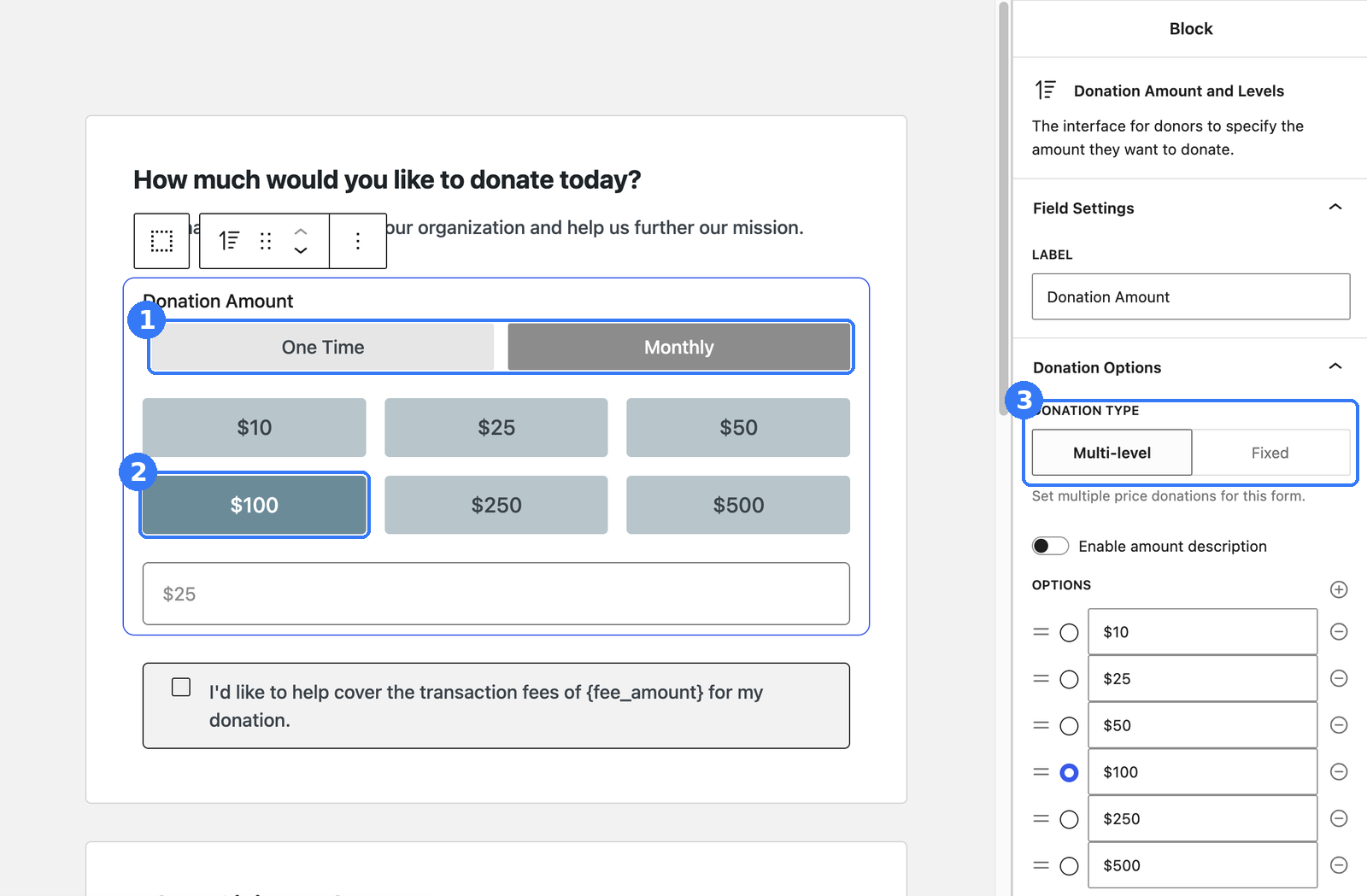
- Turn on recurring options for that form. Offer monthly as the highlighted choice and keep one-time available. If you also want quarterly or annual, add them; those are the frequencies supported in person.
- Enable the Jovvie gateway on the form. Your online gateways stay as they are.
- Run test donations. Use Stripe test cards to run a one-time gift and a monthly gift. Confirm both appear in Give and that a subscription was created for the monthly test. Test donations don’t move real money.
- Switch to Live Mode before the event. Do this the day before, not at the door.
Which amounts should you suggest for a monthly gift?
Suggest monthly amounts that feel like a small, regular commitment rather than a big one-off gift. A typical approach is three amounts with a clear “most popular” middle option, each tied to a concrete outcome. Use amounts that fit your own donors and programs; there’s no universal right number.
Be ready for GivingTuesday (December 1). Add in-person giving to the Give forms you already have — free, about five minutes to set up — and start monthly gifts at the event table.
What should volunteers say when asking for a monthly gift?
Volunteers should ask with one short, specific sentence that ties a monthly amount to an outcome, then pause and let the donor answer. The script matters less than the confidence. Practice it once out loud before doors open.
Two-line opener:
“Thanks for stopping by. Most people here today are joining as monthly supporters. $15 a month covers [specific outcome]. Would you like to start that today?”
If the donor hesitates:
“No problem. You can also make a one-time gift today, and you can change or cancel a monthly gift any time from the link in your receipt.”
Before they tap:
“Could you check the amount and our organization’s name on the screen? Your receipt will come by email from us right away.”
That last line matters more than it used to. News coverage of tap-to-pay charity scams has made some donors cautious. Showing your organization’s name on screen and sending an immediate emailed receipt helps reassure them.
What should the sign on your table say?
Your sign should state the ask, the amount and the outcome in a few words, readable from two meters away. For example:
- Headline: “Join our monthly givers”
- Line 2: “$15/month = [concrete outcome]”
- Line 3: “Tap your card or phone here. Change or cancel any time.”
- Footer: your logo and a QR code to the same Give form online, as a backup if the connection drops.
Should you lead with a one-time or a monthly ask on GivingTuesday?
Lead with monthly at conversational, staffed events and with one-time at fast, high-traffic moments. The right lead depends on how much time a donor will spend with you.
| Event situation | Lead with | Why |
|---|---|---|
| Staffed table at an open house or community event | Monthly | Time for a conversation; donors can ask questions |
| Volunteer walking through a crowd with Tap to Pay | One-time, with monthly as the follow-up option | Quick interactions; keep the tap fast |
| Gala fund-a-need or paddle raise | One-time | It’s a bidding moment; ask for monthly later in the thank-you |
| Church service or regular gathering | Monthly | Supporters already give regularly; monthly matches the rhythm |
| Unattended kiosk | One-time | No one is there to explain a commitment; keep it simple |
| GivingTuesday watch party or phone-bank evening | Monthly | Supporters are committed and receptive to “join the monthly team” |
On GivingTuesday itself, monthly gifts can also help a match. If you have a matching gift for GivingTuesday, check with the sponsor whether the first installment of a new monthly gift counts toward it, and say so on your sign if it does. For planning the stations themselves, see our event fundraising guide for GiveWP.
How do you keep new monthly donors after the event?
Keep them with fast thanks, an early impact update and an easy way to manage their gift. The first 90 days decide whether a new monthly donor stays.
- Within 48 hours: a personal thank-you email that mentions the event where they joined. Give’s receipt arrives immediately; this is the human follow-up.
- Within 30 days: a short update on what their first gift did, with a photo or story from the program it funds.
- Before the second charge: a friendly heads-up that their next monthly gift is coming, and a reminder of how to manage it.
- At 90 days: an invitation to your next event or a behind-the-scenes update, the kind of thing reserved for monthly supporters.
Donors can manage their subscriptions themselves in Give’s Donor Dashboard, including changing the amount, updating card details and canceling, depending on the gateway (Give Recurring Donations docs). Make sure your receipt and thank-you emails link to it. A donor who knows they can easily cancel is more likely to start.
Because in-person recurring gifts land in Give with the donor record intact, they flow into the same reports and segments as your online monthly donors. There’s no second list to import.
What does it cost to take recurring donations in person?
Taking recurring donations in person costs Stripe’s processing rate plus Jovvie’s platform fee on in-person donations, on top of your Give plan. Tap To Donate for Give by Jovvie is a free plugin with a free Jovvie account and no monthly fees or contracts. A platform fee of 0.5% to 2% applies to in-person donations only, depending on your donation volume, in addition to Stripe’s processing rate (WordPress.org listing). Online Give donations are unaffected.
The recurring options themselves come from Give’s Recurring Donations add-on, which is part of Give’s Pro and Elite plans (Give plans). If you already offer monthly giving online, you likely have it.
When is a different approach a better fit?
A different approach is a better fit if you don’t run Give on WordPress or don’t have the Recurring Donations add-on. If your donation forms live on another platform, use that platform’s in-person tools so recurring donors stay in one system. If you only need one-time gifts at a single event, a simple Tap to Pay setup without recurring options is enough to start. For a broader comparison of giving apps, bundled platforms and Stripe plus WordPress, see BizSwoop’s nonprofit in-person payments strategy guide.
Frequently asked questions
Can donors start a recurring donation in person?
Yes. Tap To Donate for Give by Jovvie supports monthly, quarterly and annual recurring donations on in-person transactions. The subscription is created in Give and renews automatically.
Do I need Give’s Recurring Donations add-on?
Yes. The recurring options on a Give form come from Give’s Recurring Donations add-on, which is included in Give’s Pro and Elite plans. Jovvie adds the in-person payment method; the recurring schedule comes from Give.
How to get recurring donations at an event?
Offer a highlighted monthly option on a short in-person form, have volunteers ask with a one-line script tied to a concrete outcome, and take the first payment on the spot. Then follow up within 48 hours and again at 30 days.
What is a recurring donor?
A recurring donor gives automatically on a schedule (monthly, quarterly or annually) instead of making a single gift. With Give, each recurring gift is a subscription attached to the donor’s record.
Can donors change or cancel a recurring gift later?
Yes. Donors can manage their subscriptions in Give’s Donor Dashboard, including changing the amount, updating card details and canceling, depending on the gateway.
How can donors tell an in-person donation request is legitimate?
Encourage donors to check that your organization’s name and the amount appear on screen before they tap, and send an emailed receipt from your organization immediately. Volunteers should wear name badges, and your sign should show your logo and a QR code to your official donation form.
What happens if the Wi-Fi drops during the event?
There’s no offline mode, so the device needs Wi-Fi or mobile data for Stripe to authorize each gift. Bring a hotspot, and keep a QR code to the same Give form so donors can finish on their own phone.
What are some examples of monthly giving programs?
Common examples are named giving circles (“Friends of the Library”), sponsor-a-child or sponsor-an-animal programs, and sustaining memberships for public media and arts organizations. Each ties a regular amount to an ongoing outcome, which is the same framing that works on an event sign.
Start monthly gifts at your GivingTuesday table
GivingTuesday is December 1. If your campaign already runs in Give, your event table can do more than collect one-time gifts: it can start monthly gifts that renew in the same system as your online donors. Tap To Donate for Give by Jovvie adds Tap to Pay, card readers and kiosk mode to the forms you already have — free, about five minutes to set up.
Set it up in Test Mode this week, run a test monthly gift, and you’ll be ready well before December 1.
Sources and primary documentation: Tap To Donate for Give by Jovvie on WordPress.org, Jovvie for Give, Jovvie setup documentation, Give Recurring Donations (Nexcess docs), Give plans (Liquid Web), How Tap to Donate Technology Works and What It Costs (Liquid Web), How to Ask for Monthly Gifts at Your Gala Event (NonProfit PRO), Stripe pricing.
