
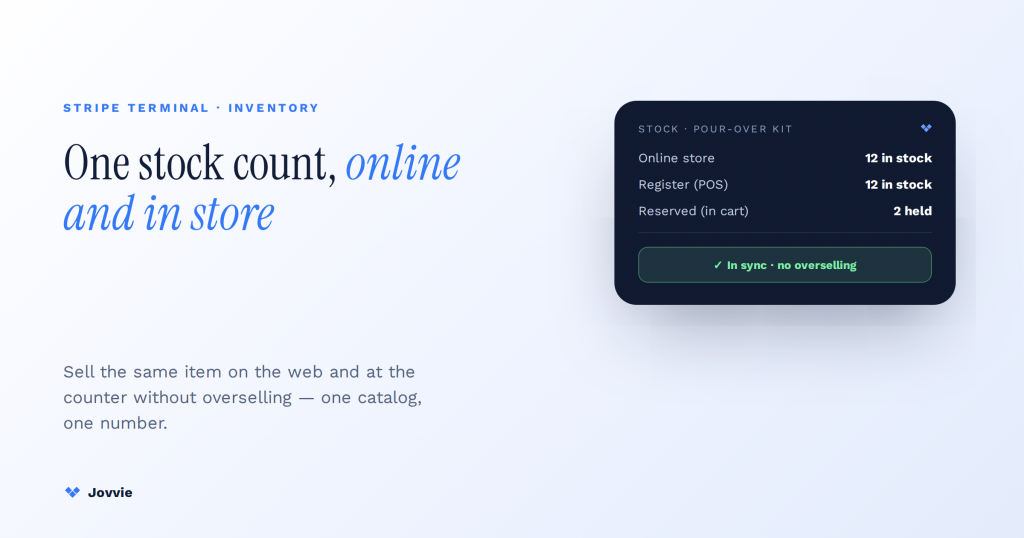
You keep online and in-person inventory in sync with Stripe Terminal by understanding one thing first: Terminal does not manage inventory at all. It captures a card-present payment and creates or completes an order; the order is what decrements stock, and that decrement happens in your commerce platform — WooCommerce — which is the single source of truth every other channel reads from. Sync, then, is never “Terminal to store.” It is Terminal → order → catalog → all channels. Once you see the data flow that way, the patterns that keep stock correct across a register and a website stop being mysterious and become a small set of well-understood architecture choices: unified vs synced catalog, reservation timers, conflict resolution, and per-location safety stock. This guide maps each one onto a real Stripe Terminal checkout.
Key Takeaways
- Terminal does not manage inventory. It captures a card-present payment and creates an order; the order is what decrements stock.
- WooCommerce is the single source of truth. Every channel — website, second register, marketplace feed — reads the same catalog the order updates.
- The sync is order → catalog, not Terminal → website. Design around that and overselling shrinks to a small, solvable set of races.
- Unified beats synced on WooCommerce. One stock field the register and site both write can’t disagree with itself; a separate POS DB has to be reconciled.
- Reserve the last unit the instant it enters a cart. A short hold-stock timer at the register — a minute or two, not the 60-minute web default — prevents the register-vs-website oversell.
- Multi-location is per-location stock, not a global pool. Tag each Terminal sale with its Stripe Location and hold a small per-location safety buffer to absorb sync lag.
We have built WooCommerce point-of-sale on Stripe Terminal for eight years — single boutiques through multi-region retailers across more than 30 countries — and Jovvie is an official Stripe Partner, so this is written from systems we have actually shipped, not from the API reference alone. The reason this piece exists is that almost every guide ranking for “stripe terminal inventory sync” gets the foundational fact wrong. Generic omnichannel articles (Shopify, Logiwa, realtimepos) describe sync abstractly and imply the POS “does” inventory; the Stripe-Terminal-for-WooCommerce plugin pages describe a product without describing the architecture. None of them says plainly that Terminal has no inventory concept. That clarity is the whole point of this article, and it is what makes the rest of the design obvious.
If you want the step-by-step implementation rather than the architecture, our legacy how-to — how to set up a synchronized WooCommerce POS system — is the “how.” This piece is the “why and which pattern.” For the register itself, start with how Stripe Terminal works as a point-of-sale system.
How do you keep online and in-person inventory in sync with Stripe Terminal?
You keep inventory in sync by making the commerce catalog the single source of truth and treating every Stripe Terminal sale as an order that decrements that catalog — the same catalog your online store reads from. Stripe Terminal is the payment layer, not the inventory layer.
Here is the data flow, in the order it actually happens:
- A customer brings an item to the register. Your POS (Jovvie, on top of the Stripe Terminal SDK) looks up the product in WooCommerce — the source of truth — and adds it to a cart.
- The POS creates a PaymentIntent and collects the card-present payment through the reader (Stripe Terminal payments). Stripe authorizes and captures the money. At no point does Stripe know or care how many units you have.
- On a successful payment, the POS creates or completes a WooCommerce order. That order line reduces the product’s stock in WooCommerce via WooCommerce stock management.
- Because WooCommerce is the single source of truth, every channel that reads from it — your website storefront, a second location’s register, a marketplace feed — now sees the reduced quantity. That propagation is “the sync.”
The mistake that causes overselling is thinking the sync is between Terminal and the website. It is not. The sync is between the order a Terminal payment produces and the catalog every channel shares. Terminal is upstream of the order; inventory is downstream of it. Design around that and the failure modes shrink to a small, solvable set.
Does Stripe Terminal track inventory?
No. Stripe Terminal has no inventory concept whatsoever — no stock counts, no SKU quantities, no product availability. It is a payment-capture SDK and hardware line. Its objects are PaymentIntents, Readers, and Locations; there is nothing in the Terminal API that represents “how many of this do I have.”
This is not a limitation to work around; it is the correct separation of concerns. Payment processing and inventory management are different problems with different sources of truth, and coupling them is how systems drift out of sync. Stripe’s job is to move money safely. Your commerce platform’s job is to know what is in stock. Terminal connects a physical card tap to a WooCommerce order, and WooCommerce owns the count. Any article implying Terminal “updates stock levels” has skipped the one clarification that makes the architecture make sense.
Unified catalog vs synced catalog: two patterns, one decision table
There are two architectures for keeping stock correct across online and in-person, and the right choice depends on whether your channels can share one system or must run separate ones. A unified catalog is a single system of record read by every channel; a synced catalog is two or more systems kept aligned by a sync process.
| Unified catalog | Synced catalog | |
|---|---|---|
| Structure | One system of record (WooCommerce). POS and website both read/write the same stock field. | Separate systems (e.g., a standalone POS DB + WooCommerce) reconciled by a sync job or webhooks. |
| Stock accuracy | Highest — there is only one number, so it cannot disagree with itself. | Depends on sync latency; brief windows where systems disagree. |
| Overselling risk | Lowest — a single source can’t oversell itself if writes are serialized. | Real during the sync interval; needs reservation/conflict handling. |
| Latency | Real-time by definition (same store). | Bounded by sync frequency (real-time webhooks vs. polling interval). |
| Complexity | Lower architecturally; requires the POS to be catalog-native. | Higher; every sync is a distributed-systems problem. |
| Best for | WooCommerce operators wanting one truth — most single-platform merchants. | Businesses locked into a separate POS system that can’t be replaced. |
| Jovvie approach | ✅ This. Jovvie is WooCommerce-native, so the register writes to the same catalog as the site. | Used only when a legacy POS must stay in the loop. |
The honest recommendation: if you are on WooCommerce, choose the unified catalog. The reason “stripe terminal inventory sync” is even a hard problem for most merchants is that they bolted a separate POS onto their store and now maintain two truths. A WooCommerce-native POS on Stripe Terminal removes the sync problem instead of solving it — the register and the website are literally reading and writing the same stock field, so there is nothing to reconcile. A synced catalog is the right pattern only when a legacy or specialized POS genuinely cannot be replaced; then you accept the reconciliation cost and lean on the reservation and conflict patterns below.
Reservation and hold-stock timers: preventing the “last unit” race at the register
A reservation (hold-stock) timer temporarily earmarks stock the instant it enters a cart, so the last unit cannot be sold twice while a transaction is in flight. This is the specific mechanism that prevents the register-versus-website race no competitor walks through in a Terminal context.
Picture the failure it prevents. One unit of a product is left. A customer at the counter brings it to the register; at the same second, an online shopper adds it to their cart. Without a hold, both transactions read “1 available,” both proceed, and one customer gets an oversell cancellation. Card-present makes this worse because the in-person customer is physically holding the item — you cannot email them a refund and call it resolved.
The reservation pattern fixes it by decrementing available stock at cart-add or checkout-start, not at payment success:
- At the register: when the POS adds the last unit to the Terminal cart, it places a hold on that unit immediately — before the card is even tapped. WooCommerce supports exactly this through its “hold stock” mechanism for pending orders, which reserves inventory for unpaid orders for a configurable window (default 60 minutes; set it far lower for a fast-moving register).
- Online: the storefront now sees the unit as reserved, not available, so the online shopper cannot add it.
- On payment success: the hold converts to a permanent decrement as the order completes.
- On abandonment or failure: the hold expires after the timer and the unit returns to available stock automatically.
The key tuning decision is the timer length. A 60-minute web-checkout hold is far too long for a register, where a transaction resolves in seconds; a stale hold on a busy floor blocks sellable stock. For POS carts, hold windows in the range of one to a few minutes are typical, long enough to cover a card decline and retry, short enough that an abandoned counter cart frees the unit fast. In a unified-catalog setup this hold is trivially correct because there is one stock field to hold against; in a synced setup, the hold must propagate across systems within the sync window, which is precisely where synced catalogs get fragile.
Two systems drifting out of sync?
Jovvie is a WooCommerce-native Stripe Terminal POS — the register writes to the same catalog your site reads, so there is nothing to reconcile.
Start your free trial →Conflict resolution: last-writer-wins, timestamp precedence, and reservation locking
Conflict resolution is how you decide what happens when two channels try to change the same stock number at once. The three standard strategies are reservation locking (prevent the conflict), last-writer-wins (accept the latest change), and timestamp precedence (order changes by when they occurred) — and the right one depends on whether you run a unified or synced catalog.
Reservation locking is the strongest and the one you want at a register. Rather than resolving conflicts after they happen, it prevents them: the hold-stock timer above is a lock — once a unit is reserved for a Terminal cart, no other channel can claim it. In a unified catalog with serialized writes, reservation locking effectively eliminates oversell because every decrement passes through one gatekeeper. This is the default Jovvie relies on.
Last-writer-wins accepts whichever update arrives most recently as the truth. It is simple and common in synced systems, but for inventory it is dangerous on its own: if the register writes “5 units” and a near-simultaneous web sale writes “5 units” (each unaware of the other’s decrement), last-writer-wins lands on 5 when the truth is 4. Use it only for non-quantity fields (title, price, description) where the latest edit genuinely should win — never as your sole strategy for stock counts.
Timestamp precedence orders changes by an authoritative event time and applies decrements in sequence, so two sales against the same SKU both register as decrements (−1 and −1 = −2) rather than overwriting each other. This is the correct base behavior for stock in a synced catalog: treat inventory changes as deltas applied in time order, not as absolute values that overwrite. Combine timestamp-ordered deltas with reservation locking during the sync window and a synced catalog can approximate the safety of a unified one.
The practical hierarchy: reserve to prevent conflicts, apply stock changes as time-ordered deltas so they add up instead of overwriting, and reserve last-writer-wins for descriptive fields only. A unified catalog gets most of this for free; a synced catalog has to engineer it deliberately.
Multi-location inventory and per-location safety stock
Multi-location inventory means each store tracks its own stock, and the source of truth resolves availability per location rather than as one global pool — with safety-stock buffers to absorb sync lag. This is where “sync” stops being one number and becomes a small matrix.
When you run more than one location on Stripe Terminal, each physical store is modeled as a Stripe Location with its readers registered to it, and inventory should be tracked per location in WooCommerce so a sale at Store A does not wrongly decrement Store B’s shelf. The architecture is the single-store pattern repeated per location: Terminal → order (tagged with its Location) → catalog decrement for that location → propagation. For the full chain-POS structure, see multi-location POS with the Stripe Terminal Locations API.
Two multi-location concepts matter for sync accuracy:
- Per-location stock, not a global pool. Availability is a question about a specific store or the warehouse, not the company as a whole. A customer buying in person at Store A can only take Store A’s stock. Ship-from-store and buy-online-pickup-in-store (BOPIS) flows need per-location counts to route correctly.
- Safety stock as a sync buffer. Because any synced system has a brief window where counts can disagree, holding a small per-location safety buffer (e.g., treat “2 remaining” as “0 available online” for a fast-moving item at a busy store) absorbs the race between an in-person Terminal sale and an online order for the same unit. Safety stock is the pragmatic hedge that trades a tiny amount of sellable inventory for a large reduction in oversell incidents. In a unified catalog with reservation locking you need less of it; in a synced catalog it is often what keeps you honest.
The Jovvie approach: real-time WooCommerce ↔ Terminal sync
Jovvie removes the inventory-sync problem rather than solving it, because it is a WooCommerce-native POS: the Stripe Terminal register writes to the same WooCommerce catalog your website reads from, so there is one source of truth and nothing to reconcile.
In practice this means the four patterns above collapse into a much simpler operational reality. There is no separate POS database, so no synced-catalog reconciliation and no last-writer-wins ambiguity — you are in the unified-catalog column of the decision table by default. Reservation locking uses WooCommerce’s native hold-stock mechanism against the single stock field, tuned to register-appropriate timers. Multi-location uses Stripe Locations mapped to per-location WooCommerce stock. And every Stripe Terminal sale becomes a real WooCommerce order the moment the card is captured, so the website reflects the new count in real time — the same count, not a copy of it.
That is the whole value proposition: the honest architecture (Terminal captures payment; WooCommerce owns stock) is also the easiest one to operate, and it is the one we have shipped for eight years. If you are wrestling with two systems drifting out of sync, the fix is usually not a better sync job — it is one catalog. For the hands-on build, follow our WooCommerce POS synchronization how-to; to see how the register handles money end to end, read cash management with a Terminal POS.
FAQ
Does Stripe Terminal track inventory?
No. Stripe Terminal is a card-present payment SDK and hardware line with no inventory concept — no stock counts, no SKU quantities. Inventory is tracked in your commerce platform (WooCommerce). Terminal captures the payment and produces an order; the order is what decrements stock.
How do I sync WooCommerce inventory with in-store (POS) sales?
Use a WooCommerce-native POS on Stripe Terminal so the register writes to the same WooCommerce catalog as your website. Each in-store sale creates a WooCommerce order that decrements the shared stock field, and every channel reading that catalog sees the updated count. This “unified catalog” approach eliminates the sync problem instead of managing it.
How do you prevent overselling across online and in-person channels?
Reserve stock the moment it enters a cart — including at the register — using a hold-stock timer, so the last unit is locked while a transaction is in flight. Combine reservation locking with per-location stock and a small safety-stock buffer for fast-moving items. A single source of truth with serialized writes is the strongest defense.
Can Stripe Terminal update stock levels automatically?
Not by itself — Terminal has no stock concept. But the order created by a Terminal payment updates stock automatically in WooCommerce, and that update propagates to every connected channel. The automation lives in the commerce platform, triggered by the Terminal-generated order, not in Terminal.
How does multi-location inventory work with a POS?
Each store is modeled as a Stripe Location with its own registered readers, and stock is tracked per location in WooCommerce. A Terminal sale is tagged with its Location and decrements that store’s stock, not a global pool. Per-location safety stock absorbs the brief windows where counts could otherwise disagree.
Get your inventory architecture right the first time
If your online and in-person stock keep drifting apart — or you are adding a Stripe Terminal register to a WooCommerce store and want the catalog, reservations, and multi-location model right from day one — Jovvie gives you one catalog and nothing to reconcile. Start free, or book an architecture consult and we’ll map the right pattern to your operation.
