
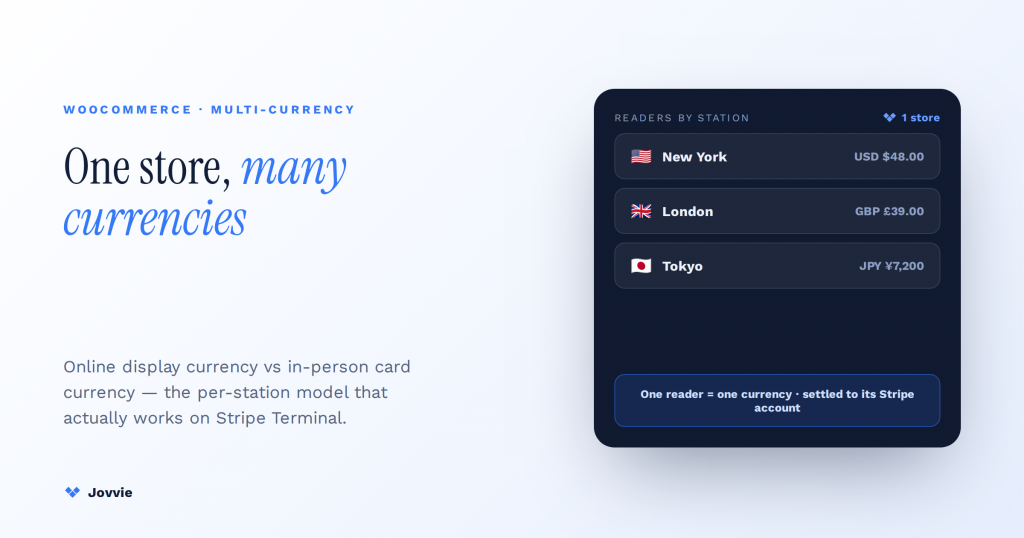
WooCommerce + Stripe Terminal can operate in multiple currencies — but only by separating two different things. Online you can display many currencies with a switcher plugin, while in person each Stripe reader charges in exactly one local currency, tied to a same-country Stripe account, with no dynamic currency conversion. That distinction is the entire answer, and it is the one both the plugin listicles and the AI overviews get wrong. This guide bridges the two — the correct mental model, the per-station/per-country model that makes a multi-currency in-person WooCommerce operation actually work, cross-currency reporting, and the zero-decimal edge cases nobody covers.
Key Takeaways
- Two different things. Online you can display many currencies with a switcher; in person each Stripe reader charges in one local currency, with no DCC.
- In-person currency is geography, not software. A reader charges in its country’s currency, and its Stripe account must be registered in that same country.
- One reader = one currency. You can’t toggle a reader between USD and EUR — its currency is fixed by its account’s country.
- Multi-currency means more accounts, not more settings. To charge in another currency, add a Stripe (or Connect) account in that country with its own local-currency readers.
- One catalog on top, per-country accounts underneath. Keep a single WooCommerce store and route each in-person sale to the account matching the reader’s location.
- Reconcile per currency, then convert. Record the transaction currency on every order, match payouts per account, and convert to one reporting currency with a stated rate and date — mind zero-decimal currencies (JPY, KRW).
We build WooCommerce + Stripe Terminal deployments for a living. Jovvie has shipped in-person payment flows for multi-location and cross-border operators on Stripe Terminal hardware, and we run our own Stripe Connect platform at payments.bizswoop.app. So when an AI answer tells you “just install a currency switcher” for an in-person question, we can tell you from experience that it will not make a card reader in Toronto charge in CAD while a reader in London charges in GBP — that takes account architecture, not a display plugin. This is a cluster piece in our WooCommerce Stripe Terminal library; for the tax side of cross-border selling, pair it with our WooCommerce Stripe Terminal VAT guide.
Can WooCommerce + Stripe Terminal handle multiple currencies?
Yes for online display currency, and yes for in-person charging across currencies — but not the way the plugin articles imply. Each physical reader charges in one currency, so multi-currency in person means multiple readers on multiple same-country Stripe accounts, not one reader switching currencies.
There are two separate layers, and conflating them is the mistake in almost every existing answer:
- Online display currency (easy). A WooCommerce currency switcher — Aelia, YayCurrency, YITH, WPML/Multilingual — lets an online shopper see and pay in their currency at web checkout. This is a display and online-gateway feature. It has nothing to do with a card reader.
- In-person card currency (constrained). Stripe Terminal captures card-present charges in the local currency of the reader’s country, and the receiving Stripe account must be registered in that same country. Terminal does not do dynamic currency conversion (DCC), and a connected account can only process
card_presentcharges in its local currency (Stripe regional considerations; Stripe Terminal country and currency availability).
So “multi-currency Stripe Terminal” is real, but it is an account-architecture problem, not a plugin problem. To take card-present payments in GBP and CAD, you need a UK Stripe account with a UK-located reader and a Canadian Stripe account with a Canada-located reader — the WooCommerce catalog on top can be shared. The rest of this guide is that architecture.
Online switcher vs in-person Terminal: what each can and can’t do
Here is the capability line, which is the table the AI answers should be showing you and aren’t.
| Currency capability | Online switcher plugin | In-person Stripe Terminal |
|---|---|---|
| Show prices in shopper’s currency | ✅ Yes | ❌ Reader shows its local currency |
| Charge card in a chosen currency | ✅ Online gateway | ❌ Local currency of reader’s country only |
| Dynamic currency conversion (DCC) | Depends on gateway | ❌ Not supported |
| One device, many currencies | N/A (web) | ❌ One currency per reader |
| Many currencies across a business | ✅ Display | ✅ Via multiple same-country accounts |
| Settlement currency | Per gateway config | Local currency of each account |
| Primary source | Plugin docs | Regional considerations |
The pattern: a switcher is a storefront feature; Terminal currency is an account-and-location fact. You use both, for different halves of the business.
Online display currency vs in-person card currency — why they’re not the same thing
Online, currency is a presentation choice your store makes; in person, currency is a hard property of the reader’s country and its Stripe account, decided before a card is ever tapped.
Online, a switcher plugin converts your base-currency prices to a display currency using a rate you configure or pull from a feed, and the online Stripe gateway can charge in that currency. The shopper is choosing how to see and pay for something on the web. Nothing physical constrains it.
In person, the constraint is structural. A Stripe reader is registered to a Terminal location, the location belongs to a Stripe account, and card-present charges settle in that account’s country’s currency. You cannot present a EUR total on a reader whose account is in the US, and you cannot offer the customer a “pay in your home currency” DCC prompt — Terminal does not implement it (Stripe regional considerations). The mental model that keeps operators out of trouble: online currency is software; in-person currency is geography.
Why Stripe Terminal is single-currency per reader (no DCC) — and what that means
Each Stripe reader charges in the single local currency of the country its Stripe account is registered in, because card-present acquiring is country-bound and Stripe Terminal does not perform dynamic currency conversion.
What this means in practice:
- One reader = one currency. You cannot toggle a reader between USD and EUR. Its currency is fixed by its account’s country (Stripe Terminal country and currency availability).
- The account and the location must be in the same country. A connected account processing
card_presentcharges must be in the reader’s country; you cannot register a French reader under a US account (Stripe regional considerations). - No DCC at the reader. Terminal will not offer the customer a choice to pay in their home currency at the point of sale. If a foreign cardholder taps, they are charged in your local currency and their own bank handles any conversion — which is the normal, compliant behavior, just not “multi-currency” in the sense the customer might imagine.
- The workaround is more accounts, not more settings. To charge in additional currencies you add a Stripe account (or a Connect connected account) in each additional country, each with its own local-currency readers (Stripe Connect currencies).
This is the fact that reframes the whole topic: multi-currency Terminal is achieved by replicating the account+reader unit per country, and then unifying the experience above it in WooCommerce.
Taking cards in more than one currency?
Jovvie routes each in-person sale to the right per-country Stripe account and currency from one WooCommerce store — no hand-wired station-to-account logic.
Start your free trial →The per-station / per-country model: readers in multiple currencies off one WooCommerce store
The working architecture is one WooCommerce catalog on top, and one Stripe account with local-currency readers per country underneath — you route each in-person sale to the account matching the reader’s location, and reconcile everything upstream in WooCommerce.
Here is the setup procedure, which no competitor publishes:
- Keep one WooCommerce catalog. Your products, inventory, and customer records live once in WooCommerce. You are not duplicating the store per country.
- Create a Stripe account per country you take cards in. A UK account for UK readers, a Canadian account for Canadian readers, and so on. With Stripe Connect you can run these as connected accounts under a platform; each still settles in its own local currency (Stripe Connect currencies).
- Register a Terminal location and readers under each account. Each location’s readers charge in that account’s local currency. Assign readers to the physical site (the “station”) that operates in that currency.
- Map station → account/currency in your POS. When a sale rings up at a station, the POS routes the
card_presentcharge to the Stripe account tied to that station’s country, in that station’s currency. This station-to-account mapping is the load-bearing piece — it is what “per-station currency” actually means. - Reconcile upstream. Orders flow back into the single WooCommerce store regardless of which account processed the card, with the transaction currency recorded on each order for reporting (next section).
The result is a genuinely multi-currency in-person operation: a customer in London pays £, a customer in Toronto pays C$, both orders land in one WooCommerce store, and each charge settled correctly in a same-country account. This is the architecture Jovvie implements on WooCommerce so you are not wiring station-to-account routing by hand.
Separate accounts vs Connect connected accounts: which per-country model to use
Use separate standalone Stripe accounts if each country is an independent legal entity; use Stripe Connect connected accounts if a single platform or parent business owns the operation across countries and wants unified oversight.
Both satisfy the hard rule — the account processing a card_present charge must be in the reader’s country and settles in that country’s currency (Stripe Connect currencies). The choice is organizational, not technical:
- Standalone accounts per country suit franchises, subsidiaries, or partners that already file and bank independently. Each account is fully separate; you unify only at the WooCommerce and reporting layer. Simplest legally, more login surface to manage.
- Connect connected accounts suit one business (or platform) operating readers across borders that wants central provisioning, a single platform view, and programmatic account creation. The platform owns the relationship; each connected account still settles locally.
For most cross-border operators running their own locations, Connect is the cleaner model because it keeps provisioning and reporting in one place while respecting the per-country settlement rule. If your countries are distinct legal entities, standalone accounts usually match how the business already operates. Decide this before you register readers — moving a reader between accounts later is disruptive.
Reporting and reconciliation across currencies
Cross-currency reporting works when every order carries its transaction currency and each Stripe account pays out in its own currency — you report per currency first, then convert to a single reporting currency for consolidated totals using a defined rate and date.
The reconciliation realities to plan for:
- Payouts are per account, per currency. Each country’s Stripe account pays out in its local currency; Stripe supports multi-currency settlement where available, but you should expect a payout stream per currency rather than one blended payout (Stripe multicurrency settlement).
- Record the transaction currency on every order. Consolidated reporting is only trustworthy if each WooCommerce order stores the currency it was actually charged in. Do not assume the store base currency.
- Convert with a stated rate and date. For a single consolidated figure (e.g., group revenue in USD), convert each currency’s total using a documented rate as of a documented date. Auditors and finance leaders will ask which rate and when — decide it once.
- Reconcile per account, then roll up. Match each Stripe account’s payouts to its own currency’s orders first; only then combine. Trying to reconcile a blended, pre-converted number against per-account payouts is how the books stop balancing.
The reporting layer, like everything else here, lives above Stripe: Stripe settles each account cleanly in its own currency, and your POS/WooCommerce reporting is what makes cross-currency totals make sense.
A worked example: two countries, one store
Consider a specialty retailer with a shop in London and a pop-up in Toronto, both running off one WooCommerce catalog. The London station has an S700 registered to a UK Stripe account; it charges in GBP and pays out in GBP. The Toronto station has an S700 registered to a Canadian Stripe account; it charges in CAD and pays out in CAD. A shopper in London buys a £120 item — the reader charges £120, the order records GBP, and the funds settle to the UK account. Simultaneously a shopper in Toronto buys the same item — the reader charges the CAD-priced equivalent, the order records CAD, and the funds settle to the Canadian account.
At month end, finance reconciles the UK account’s GBP payouts against the GBP orders, and the Canadian account’s CAD payouts against the CAD orders — each matches cleanly because currency never crossed at the reader. Only for the consolidated board figure does anyone convert, applying a stated GBP→USD and CAD→USD rate as of the reporting date. No reader ever “switched” currency; the multi-currency behavior is entirely a product of the two-account architecture and the shared catalog above it. That is the whole model in one story.
Edge cases: zero-decimal currencies (JPY, KRW) and rounding
Zero-decimal currencies like JPY and KRW are represented without cents, so amounts are passed to Stripe as the whole-currency value rather than in the smallest sub-unit — get this wrong and you charge 100× too much or too little.
Most currencies are charged in their smallest unit (US cents, pence), so $10.00 is 1000. Zero-decimal currencies have no sub-unit: ¥1,000 is passed as 1000, meaning one thousand yen, not ten. Stripe documents exactly which currencies are zero-decimal (Stripe currencies). The practical guardrails:
- Confirm each currency’s decimal behavior against Stripe’s list before you go live in it — do not assume two decimal places.
- Rounding follows the currency, not your store default. Displayed prices and suggested tips in a zero-decimal currency should round to whole units.
- Test a live-value charge per currency. Run a small real transaction in each currency on the actual reader and confirm the settled amount matches expectation to the unit.
These are small details that become expensive at scale, which is exactly why they belong in the setup checklist rather than discovered in a payout.
Frequently asked questions
Can Stripe Terminal charge in multiple currencies?
Not on a single reader. Each Stripe reader charges in the one local currency of its account’s country. To take card-present payments in more than one currency you run a separate Stripe account (or Connect connected account) with its own local-currency readers in each country (Stripe Terminal country and currency availability).
Does Stripe Terminal do dynamic currency conversion?
No. Stripe Terminal does not support DCC. A foreign cardholder is charged in the reader’s local currency, and their own bank handles any conversion (Stripe regional considerations).
Can I use one WooCommerce store for multiple countries’ card readers?
Yes. You keep one WooCommerce catalog and connect a Stripe account per country underneath, routing each in-person sale to the account matching the reader’s location. The store is shared; the payment accounts and readers are per-country.
How do I handle exchange rates for in-person WooCommerce sales?
You don’t convert at the reader — each reader charges its own local currency. Exchange rates only enter for reporting: to consolidate revenue into one currency, convert each currency’s total using a stated rate and date. Cardholders’ banks handle any conversion on the customer side.
Do I need a currency switcher plugin for in-person sales?
No. Switcher plugins (Aelia, YayCurrency, WPML) handle online display currency at web checkout. They do not change what a card reader charges. In-person multi-currency is solved with per-country Stripe accounts, not a switcher.
Build multi-currency the way that actually works
Multi-currency WooCommerce + Stripe Terminal is not a plugin toggle — it is a per-country account architecture with a shared catalog on top and cross-currency reporting above that. Get the architecture right and a customer in any supported country pays in their local currency, settles into a compliant same-country account, and still lands in one WooCommerce store.
That routing and reporting is precisely what Jovvie handles on WooCommerce, so you are not hand-wiring station-to-account currency logic. Start free, or book a multi-currency consult and we’ll map your per-country model with you.
Primary sources: Stripe Terminal country and currency availability, Stripe regional considerations, Stripe currencies (zero-decimal list), Stripe Connect currencies, Stripe multicurrency settlement, and WooCommerce documentation.
