
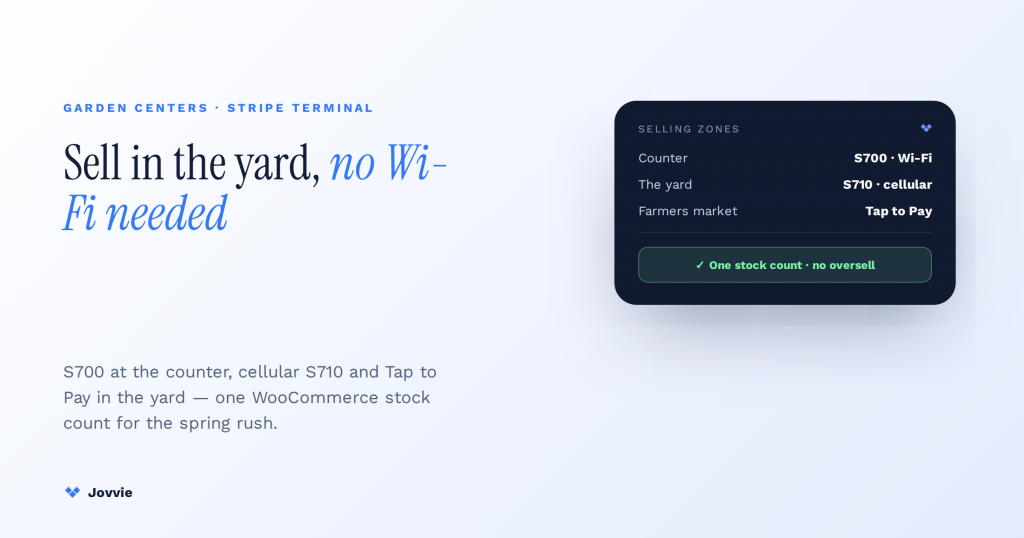
Yes — a garden center can absolutely use Stripe Terminal. Put a Stripe Reader S700 (or the cellular S710) at the counter, use Tap to Pay on iPhone plus the S710’s built-in cellular for the yard, greenhouses, and seasonal stands where Wi-Fi doesn’t reach, and back the whole thing with a WooCommerce catalog through a POS layer like Jovvie so seasonal stock never oversells across your online and in-person sales. What Stripe Terminal handles brilliantly is the card-present transaction anywhere on your property — even out in the lot with no wall power or Wi-Fi. What it does not do on its own is plant databases, weatherproof tag printing, or grow-site inventory. That’s the honest fit boundary, and it’s the one every “best nursery POS” page skips because they’re all selling a dedicated green-industry system.
Key Takeaways
- Yes — a garden center can use Stripe Terminal. Card-present payments anywhere on the property: counter, yard, greenhouse aisle, or a seasonal stand.
- The outdoor problem is connectivity, and it’s solved. Tap to Pay for a zero-hardware phone till, and the S710’s built-in cellular for a standalone reader with no Wi-Fi.
- One WooCommerce stock count for the spring rush. A Jovvie register decrements the same inventory online or in the yard, so a demand spike never oversells perishable stock.
- A common kit: S700 + roaming S710 + Tap to Pay. Counter, yard, and farmers-market booth all covered; a lean nursery can start with Tap to Pay and a ~$59 M2.
- Terminal doesn’t do plant data. No plant databases, weatherproof tag printing, or grow-site tracking — that’s the honest fit boundary.
- A dedicated nursery POS earns its cost when you live on tags. Batch/lot living-inventory, UV-stable labels, and grow-site tracking are worth paying for; otherwise Terminal + Jovvie wins.
We build WooCommerce-native POS on Stripe Terminal for a living. Jovvie has eight years of WooCommerce POS behind it, official Stripe Partner status, and our own Stripe Connect platform at payments.bizswoop.app. We’re not a nursery-POS vendor with a product to defend, so we can tell you plainly: for a small or independent nursery, a seasonal stand, or a farmers-market booth, Stripe Terminal plus a WooCommerce POS is a genuinely strong, low-cost setup — and for a large garden center that lives and dies by plant tags and grow-site tracking, a purpose-built system like Rapid Garden POS or POS Nation earns its cost. This is a cluster piece under the Stripe Terminal industry use-case pillar, and a close cousin to our pop-up shop quick-deploy kit.
Can a garden center use Stripe Terminal?
Yes. Stripe Terminal takes card-present payments anywhere a garden center sells — the counter, the yard, a greenhouse aisle, or a seasonal stand — and pairs with a WooCommerce POS to handle the catalog, inventory, and customer side of the sale.
The reason this question gets asked at all is that when you search for garden-center payments, every result is a dedicated nursery-POS vendor, and none of them mentions Stripe Terminal as an option. So it looks like Stripe “doesn’t do” garden centers. It does. Stripe Terminal is payment hardware plus an API; a garden center is a retail business with an outdoor twist. The reader authorizes the card, and the outdoor twist — no Wi-Fi in the back lot, seasonal demand spikes, selling from a wagon — is solved by choosing the right connectivity (cellular and Tap to Pay) and the right software layer on top. The rest of this guide draws the honest line between what Stripe Terminal handles and where a full green-industry POS is still the better buy.
Taking payments outdoors: Tap to Pay and the S710’s built-in cellular
The outdoor problem — no Wi-Fi in the yard or at a seasonal stand — is solved two ways: Tap to Pay on iPhone or Android for a zero-hardware mobile till, and the Stripe Reader S710’s built-in cellular for a standalone reader that brings its own connection.
This is the angle the nursery-POS vendors gloss over, because they’d rather sell you rugged bundled hardware. The cheapest mobile path is Tap to Pay on iPhone or Android: a staff member’s phone becomes the card reader, so someone helping a customer pick out shrubs by the fence line can close the sale on the spot with no extra device (Stripe Tap to Pay, Tap to Pay on iPhone). The catch is that Tap to Pay needs a live internet connection, so it depends on cellular signal reaching the yard.
When you want a proper standalone reader with a screen but there’s no Wi-Fi out back, the Stripe Reader S710 carries its own cellular connection, so it works in the lot, in an unwired greenhouse, or at a seasonal stand in the parking lot without piggybacking on store Wi-Fi (Stripe Reader S700/S710). Between the two, you’ve covered every square foot a garden center sells from — counter, aisle, yard, and pop-up stand — which is exactly what a business with more sales area outdoors than indoors needs.
Hardware for the garden center: counter, yard, and farmers-market scenarios
Match the reader to the selling spot: an S700 at the indoor counter, the cellular S710 or Tap to Pay for the yard and seasonal stands, and Tap to Pay alone for a farmers-market booth. Here’s the breakdown.
| Reader / method | Cost | Best garden-center scenario | Connectivity | Standalone |
|---|---|---|---|---|
| Tap to Pay on iPhone/Android | $0 hardware | Farmers-market booth, roaming yard sales, line-buster | Needs live internet | Runs on a phone |
| Stripe Reader S700 (Wi-Fi) | ~$299 | Indoor checkout counter with Wi-Fi | Wi-Fi | Yes — smart reader with screen |
| Stripe Reader S710 (cellular) | ~$299 | The yard, greenhouses, seasonal stands with no Wi-Fi | Built-in cellular + Wi-Fi | Yes — smart reader with screen |
| Stripe Reader M2 | ~$59 | Cheap handheld till paired to a tablet | Bluetooth to host device | No — needs a paired device |
| BBPOS WisePad 3 | ~$59 | Inexpensive backup or PIN-entry needs | Bluetooth to host device | No — needs a paired device |
(Hardware and rate figures per Stripe Terminal devices and the Stripe Reader S700 page; the in-person rate is 2.7% + $0.05 per Stripe Terminal. Confirm live pricing on Stripe’s pages, since regional pricing varies. For device management and setup, see Stripe’s Terminal documentation.)
A common, cost-effective garden-center kit is a single S700 at the indoor register, one S710 that roams the yard and doubles as your seasonal-stand reader, and Tap to Pay on a couple of staff phones for peak-weekend line-busting and off-site farmers markets. A small independent nursery can start even leaner: Tap to Pay for the market booth and a ~$59 M2 paired to a tablet for the shed counter. Because the offline and cellular options exist, connectivity — usually the hardest part of outdoor retail — stops being a blocker.
Selling the same stock online and in the yard?
Jovvie keeps one WooCommerce stock count across both channels, so a spring rush never oversells a perennial you don’t have — the piece a payments-only reader can’t give you.
Start your free trial →Seasonal peaks and inventory: unified online + in-person stock with Jovvie + WooCommerce
Seasonal demand is a garden center’s biggest inventory risk, and a WooCommerce-native POS solves it by keeping one stock count: a Jovvie register reads your WooCommerce catalog and decrements the same inventory whether a flat of annuals sold online or in the yard — so a spring rush never oversells stock you don’t have.
Garden-center inventory swings hard. Spring and the run-up to holidays spike demand on live goods that are perishable and hard to reorder quickly, and many nurseries now sell the same stock through a WooCommerce store as well as in person. Run those two channels on separate systems and you’ll oversell a popular perennial online while it’s flying off the yard shelves — the classic seasonal-retail failure. A WooCommerce store with a Jovvie POS register treats both channels as one: the catalog, prices, and stock are a single source of truth, so an in-person sale updates online availability instantly and vice versa. That real-time sync is the piece a payments-only setup can’t give you, and it’s the practical reason to add a POS layer rather than run a bare reader. For the mechanics of connecting WooCommerce to Terminal, see our Stripe Terminal for WooCommerce implementation guide.
What a WooCommerce + Jovvie setup does not do is track plants the way a specialist green-industry system does — batch/lot tracking of living inventory, grow-site locations, or automatic reorder points tuned to plant lifecycles. If that depth matters to your operation, read the next section honestly.
When raw Stripe Terminal is enough vs. when you need a dedicated nursery POS
Stripe Terminal (plus a WooCommerce POS) is enough for small and independent nurseries, seasonal pop-ups, farmers-market booths, and checkout-overflow lines; a dedicated nursery POS earns its cost when you need plant databases, weatherproof UV-stable tag and label printing, or grow-site inventory tracking across greenhouses and yards.
This is the fit boundary no vendor page will draw for you, so here it is as a decision matrix:
| Capability | Stripe Terminal + Jovvie (WooCommerce) | Dedicated nursery POS (e.g. Rapid Garden, POS Nation) |
|---|---|---|
| Card-present payments (counter, yard, market) | ✅ S700 / S710 / Tap to Pay | ✅ Bundled hardware |
| Outdoor / no-Wi-Fi selling | ✅ S710 cellular + Tap to Pay | ✅ Often rugged mobile hardware |
| In-person rate | 2.7% + $0.05 (Stripe) | Varies by vendor/processor |
| Online + in-person inventory sync | ✅ One WooCommerce store, both channels | ⚠️ Depends on the vendor’s ecommerce tie-in |
| Plant database / horticultural attributes | ❌ Not built in | ✅ Purpose-built |
| Weatherproof / UV-stable tag & label printing | ❌ Not built in | ✅ Purpose-built |
| Grow-site / batch-lot living-inventory tracking | ❌ Not built in | ✅ Purpose-built |
| Own your store & data | ✅ WooCommerce (self-hosted) | ⚠️ Usually the vendor’s platform |
| Typical cost | Jovvie licence on your existing WooCommerce | Bundled hardware + software subscription |
Read it this way. If you’re a small or independent nursery, a seasonal garden stand, or a farmers-market seller — or you simply need to add a fast overflow checkout line during the spring rush — raw Stripe Terminal plus Jovvie is a low-cost, own-your-data setup that handles payments everywhere you sell and keeps one accurate inventory. If your business genuinely runs on plant tags, horticultural attributes, weatherproof labels printed on demand, and grow-site tracking across multiple greenhouses, a dedicated green-industry POS is worth its price and we won’t pretend otherwise — that’s the specialist software Stripe Terminal doesn’t replace. Some larger operations even run both: a nursery platform for the core catalog and Stripe Terminal with Tap to Pay for mobile and event sales the main system handles awkwardly. Notably, at least one cloud nursery POS (VMX) advertises a Stripe integration, though it uses Stripe’s hosted payment rather than a Terminal-native card-present flow — worth knowing if you’re comparing.
Frequently asked questions
Can a garden center use Stripe Terminal?
Yes. Stripe Terminal takes card-present payments at the counter, in the yard, in greenhouses, and at seasonal stands. Use the Wi-Fi S700 indoors, the cellular S710 or Tap to Pay where there’s no Wi-Fi, and pair it with a WooCommerce POS like Jovvie for catalog, inventory, and customer records.
What POS system is best for a nursery or garden center?
It depends on scale. Small, independent, and seasonal operations do well with Stripe Terminal plus a WooCommerce-native POS (Jovvie) — low cost, own your data, and unified online/in-person inventory. Larger operations that need plant databases, weatherproof tag printing, and grow-site tracking are better served by a dedicated green-industry POS such as Rapid Garden POS or POS Nation.
How do garden centers take card payments outdoors?
Two ways with Stripe Terminal: Tap to Pay on iPhone or Android turns a staff phone into a reader (needs cellular signal), and the Stripe Reader S710 has built-in cellular so a standalone reader works in the yard or at a seasonal stand with no Wi-Fi. See Stripe’s Tap to Pay page and the S700/S710 page.
Do I need weatherproof hardware for outdoor plant sales?
Only for sustained exposure. For occasional yard and market sales, standard Stripe Terminal readers (S710, or a phone running Tap to Pay) are fine with basic care — keep them out of rain and direct heat. If you’re selling outdoors all day in the elements year-round, a dedicated nursery POS with ruggedized, weatherproof hardware is the safer investment.
Can I use Tap to Pay on iPhone at a farmers market or plant sale?
Yes. Tap to Pay on iPhone (and Android) needs no extra hardware — the phone is the reader — so it’s ideal for a farmers-market booth or an off-site plant sale, as long as there’s mobile signal for the live internet connection it requires (Stripe Tap to Pay on iPhone).
Set up Stripe Terminal for your garden center
Jovvie sets up Stripe Terminal for the counter, the yard, and seasonal stands on your existing WooCommerce store — cellular readers, Tap to Pay, and unified online/in-person inventory, no rebuild. Start free, or book a retail consult and we’ll map the right hardware and POS setup for how your garden center actually sells.
