
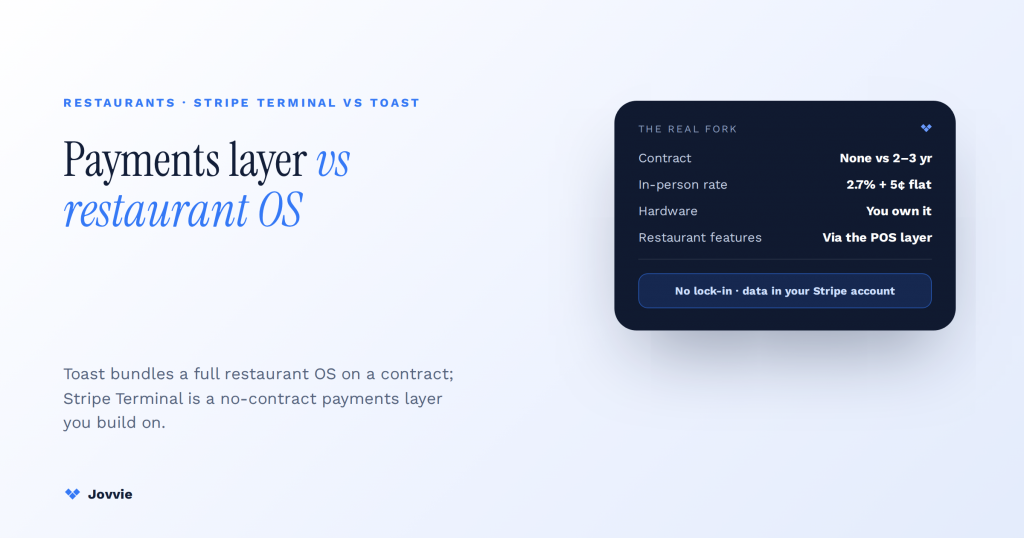
Choose Toast for a finished, restaurant-specific operating system from one vendor; choose Stripe Terminal if you already run on Stripe or WooCommerce and want in-person payments on the same rails, with no contract. Toast bundles coursing, tabs, kitchen display, and 24/7 hospitality support into one subscription — and you accept a multi-year contract and proprietary hardware to get it. Stripe Terminal is a payments layer you build on, with a POS layer you assemble to fit. Toast is a full restaurant OS you subscribe to; Stripe Terminal is a payments layer you build on. That single distinction settles the decision for most restaurants long before the processing rates do.
Key Takeaways
- Two different categories. Toast is a full restaurant OS you subscribe to; Stripe Terminal is a payments layer you build a POS on.
- The contract is the real fork. Toast means a 2–3-year term, auto-renewal, ETFs, and proprietary hardware; Stripe Terminal is pay-as-you-go with readers you own.
- Rate alone misleads. Toast’s paid 2.49% + 15¢ is gated behind ~$69/terminal/mo and a contract; its no-contract rate (3.09–3.69%) is higher than Stripe’s flat 2.7% + 5¢.
- Stripe leaves you the restaurant software. The Terminal SDK collects the card; coursing, KDS, tabs, and modifiers come from the POS layer you add.
- A pre-built POS closes the gap. Jovvie wraps Terminal for WooCommerce restaurants — register, menu/modifiers, tipping, split checks — so assembly is configuration, not a software project.
- Already on WooCommerce/Stripe? Terminal just extends it. No rip-and-replace: one Stripe account for web, mobile, and counter; one WooCommerce store for menu, stock, and customers.
We build Stripe Terminal point-of-sale deployments for a living — Jovvie has shipped in-person payment flows for restaurants, cafes, pop-ups, and multi-location operators in more than 30 countries, on top of Jovvie’s eight-year history as a WooCommerce POS. So we could write this as a Stripe sales pitch. We are not going to. For a lot of full-service restaurants, Toast is the better call, and we will say exactly when. The authority here comes from the honesty: if you read this and conclude Toast fits you better, we would rather you know that today than three months into a switch. This is a cluster piece in our Stripe Terminal point-of-sale library; if Toast is not your only comparison, see our Stripe Terminal vs Square Terminal comparison and Stripe Terminal vs Clover.
Stripe Terminal vs Toast at a glance: the 60-second verdict matrix
Toast wins on turnkey restaurant features and single-vendor support; Stripe Terminal wins on flexible pricing, data ownership, no contract, and fitting a business that already runs on Stripe or WooCommerce. They are not really the same category of product, and that is the whole point.
| Decision factor | Stripe Terminal | Toast |
|---|---|---|
| What it is | A card-present payments layer you build a POS on | A full restaurant POS + operating system |
| Best for | Existing Stripe/WooCommerce merchants, hybrid online + in-person, multi-channel operators | Full-service restaurants wanting turnkey hospitality features from one vendor |
| In-person card rate (US) | 2.7% + 5¢, flat published (Stripe) | 2.49% + 15¢ on the paid Standard plan; 3.09%–3.69% + 15¢ pay-as-you-go (NerdWallet, secondary) |
| Monthly software fee | None | $0 Starter Kit up to ~$69/terminal/mo (Point of Sale) and higher on Build-Your-Own |
| Contract | None — pay as you go | Typically 2–3-year terms, auto-renewal, early-termination fees |
| Hardware | S700 ($299), M2 ($59), or Tap to Pay ($0); bring your own devices | Proprietary Toast-branded Android hardware, ~$799+ per terminal or financed |
| Restaurant features (coursing, KDS, tabs) | You add them via the POS layer you choose (e.g. Jovvie) | Built in, out of the box |
| Online + in-person unification | One Stripe account for web, mobile, and counter | Toast’s own online ordering; separate from a non-Toast website |
| Data ownership | Lives in your Stripe account and your systems | Lives in the Toast ecosystem |
| Support | Stripe support + your POS vendor | Single-vendor 24/7 restaurant support |
If you run a full-service restaurant, have no existing payments stack you care about keeping, and want one vendor to call at 9pm on a Friday, Toast’s bundle is genuinely hard to beat and you can stop reading. If you already take payments online through Stripe or WooCommerce, run quick-service or a cafe, or simply refuse to sign a three-year contract, keep going — Stripe Terminal plus a POS layer is very likely your answer, and we will show you how to build it.
Is Stripe Terminal cheaper than Toast? The real 2026 total cost
Usually yes, once you count every line item — but the honest answer depends on your plan choice and volume. The per-swipe percentage is where most comparisons stop, and it is the least useful number.
Here is the full-cost picture with 2026 figures, side by side, for a restaurant doing roughly $80,000/month in card volume:
| Cost line | Stripe Terminal | Toast (Standard paid plan) |
|---|---|---|
| In-person processing rate | 2.7% + 5¢ | 2.49% + 15¢ |
| Monthly software fee | $0 | ~$69 per terminal |
| Hardware (per device) | S700 $299 one-time (or M2 $59, or Tap to Pay $0) | ~$799+ per terminal, or financed monthly |
| PCI / statement / batch fees | None | Common add-ons on merchant statements |
| Contract | None | 2–3 years, auto-renewal, early-termination fee |
| Est. monthly processing on $80k | ~$2,160 + per-transaction nickels | ~$1,992 + per-transaction 15¢ |
The nuance the aggregators miss: on raw percentage, Toast’s Standard paid plan rate (2.49%) can undercut Stripe’s flat 2.7% at high volume. But that lower rate is gated behind the $69/terminal/month software fee and the multi-year contract. Toast’s contract-free pay-as-you-go option runs 3.09%–3.69% + 15¢ — meaningfully more expensive than Stripe Terminal. So the real comparison is:
- Toast paid + contract: slightly lower percentage, but monthly fees, hardware markup, and a 2–3-year commitment.
- Toast pay-as-you-go: no contract, but a higher rate than Stripe Terminal.
- Stripe Terminal: flat 2.7% + 5¢, no monthly fee, no contract, cheaper hardware, no PCI/statement surprises.
For low-to-moderate volume, quick-service, cafes, and anyone unwilling to sign a contract, Stripe Terminal’s total cost of ownership is typically lower. At high volume on a full-service floor where you will use the restaurant features every day, a negotiated Toast paid plan can close or reverse the per-swipe gap — and the features may justify the spend. Run the math on your volume including every monthly line item, not just the headline percentage. Stripe’s published in-person rate is on the Stripe Terminal pricing page; we corroborate Toast’s fee structure against NerdWallet’s Toast review (labeled secondary) and Toast’s own pos.toasttab.com for plan and hardware names.
What Toast gives you that Stripe Terminal doesn’t (and how to add it back)
Toast ships a complete restaurant feature set on day one; Stripe Terminal ships a payments SDK and leaves the restaurant software to you. This is the single most important thing to understand before you choose — and it is exactly the point every AI answer and directory comparison stops at without telling you what to do about it.
Out of the box, Toast gives you:
- Menu and modifier management built for food service
- Table management, coursing, and open tabs
- Kitchen display systems (KDS) and kitchen printing
- Tip management, tip pooling, and check splitting
- Server logins, roles, and labor/reporting tools
- Toast-native online ordering, loyalty, and gift cards
Stripe Terminal, by itself, gives you none of that. The Terminal SDK discovers readers, collects a card-present payment, and confirms the charge — and that is the boundary of its job. Everything above the payment is yours to build or buy.
That is the “you assemble the rest of the stack yourself” caveat every comparison mentions and none resolves. So here is the resolution: you do not build it from scratch — you add a POS layer that already wraps the Terminal SDK. For WooCommerce restaurants, that layer is Jovvie. It supplies the register UX, the menu and modifier handling (via Product Add-ons), tipping and split-check workflows, and staff logins — sitting on top of Stripe Terminal so the card-present payment is native to your store, not bolted onto a separate system. We cover the concrete build in the section below. The short version: the gap Toast fills with a closed appliance, Stripe Terminal fills with an open stack you own — and the assembly is a configuration exercise, not a software project, when you use a pre-built POS.
Does Toast lock you into a contract? What to know before you sign
Yes — and this is the part of the decision that competitor comparisons soft-pedal, so read it carefully. Toast’s paid plans typically come with multi-year commitments (commonly 2–3 years), automatic renewal, and early-termination fees that can run into the thousands. The hardware is proprietary Toast-branded Android — you cannot bring your own iPad or reprogram the devices for another processor, and if you leave, the hardware does not come with you in any useful sense.
None of that makes Toast a bad product. For a restaurant that will use the full feature set daily and wants a single vendor accountable for uptime, a multi-year agreement is a reasonable trade. But you should sign it with eyes open:
- Term length and auto-renewal. Confirm the exact term and whether it silently renews. Diarize the cancellation window.
- Early-termination fees. Ask for the ETF in writing before signing, not after.
- Rate lock vs. rate changes. Understand whether your processing rate can change during the term.
- Hardware ownership vs. financing. Financed hardware can outlast your enthusiasm for the platform.
- Data export on exit. Ask exactly what data you can take with you and in what format.
Stripe Terminal is the opposite model: pay-as-you-go, no monthly software fee, no contract, no early-termination fee, and readers you own outright and can redeploy. If contract lock-in is the thing that makes you hesitate about Toast, it is a legitimate hesitation — and it is the single clearest reason operators choose the Stripe Terminal path even when Toast’s features are attractive.
Run a WooCommerce restaurant and want in-person without a Toast contract?
Jovvie wraps Stripe Terminal into a real register — menu, modifiers, tipping, split checks — posting card-present sales straight into your WooCommerce store.
Start your free trial →Can you actually run a restaurant on Stripe Terminal? Building the POS layer with Jovvie
Yes — you run a restaurant on Stripe Terminal by adding a POS layer on top of it, and for WooCommerce restaurants that layer is Jovvie. Stripe Terminal handles the card-present payment; the POS handles everything a restaurant floor actually needs.
Here is the concrete build for a WooCommerce-based restaurant that wants to run in person on Stripe Terminal:
- Stripe Terminal + a certified reader. An S700 at the fixed counter for a customer-facing screen, an M2 for a second station, or Tap to Pay on a phone for table-side and events. All reconcile to one Stripe account.
- Jovvie as the register. Jovvie wraps the Terminal SDK and gives your staff a real POS: order entry, item search, order status, and a card-present charge that posts straight into your WooCommerce store — no separate Toast workflow to reconcile.
- Menu and modifiers via Product Add-ons. “No onions,” “add bacon,” “medium-rare,” size and side choices — modeled as configurable options through Product Add-ons, so the kitchen ticket and the price are right every time.
- Tipping and split checks. Prompt for tips at the reader, split a check across parties, and handle partial payments in the Jovvie workflow.
- One set of data. Every in-person sale lands in the same WooCommerce store and Stripe account as your online orders — one inventory count, one customer record, one reconciliation.
This is the honest boundary of the recommendation: Jovvie is not a full replacement for a large full-service restaurant’s floor-management suite with deep coursing and a multi-station KDS — if that is your operation, Toast’s purpose-built system may still be the better fit, and we will say so. But for quick-service, cafes, counter-service, food halls, wine bars, bakeries, and the very common case of a restaurant that already sells online through WooCommerce and wants in-person on the same rails without a rip-and-replace, the Stripe Terminal + Jovvie stack is a real, shipped answer — not a theoretical one. Our restaurant Stripe Terminal guide walks the deployment in detail.
The hybrid reality: you already run online ordering on Stripe or WooCommerce
Here is a scenario the either/or comparisons never cover, because it does not fit the “which POS wins” frame: you already take online orders on Stripe or WooCommerce, and you want in-person payments on the same system without tearing anything out.
If that is you, a Toast decision is not really a payments decision — it is a rip-and-replace of your entire online ordering, menu, customer data, and reconciliation onto Toast’s ecosystem. Stripe Terminal is the opposite: it extends the system you already run to the counter. One Stripe account covers web checkout, mobile, and the card reader. One WooCommerce store holds your menu, inventory, and customers. Nothing gets migrated, and nothing gets duplicated. For a restaurant with any meaningful online presence already on these rails, “add Stripe Terminal” is a smaller, cheaper, lower-risk move than “switch to Toast” — even before you weigh the contract. This is the fork most comparisons miss, and it is where Stripe Terminal quietly wins on the merits.
Which should your restaurant pick? A decision guide by restaurant type
The right pick tracks your service model, your existing stack, and your tolerance for contracts more than your cuisine. Here is the quick guide.
| If you are… | Lean toward | Why |
|---|---|---|
| A large full-service restaurant wanting turnkey coursing, tabs, KDS, and one-vendor support | Toast | Purpose-built hospitality features and 24/7 restaurant support out of the box |
| A quick-service, counter-service, or fast-casual spot | Stripe Terminal (Jovvie) | You don’t need Toast’s full floor suite; flat pricing and no contract win |
| A cafe, bakery, wine bar, or food hall stall | Stripe Terminal (Jovvie) | Lightweight register, cheaper hardware, no monthly fee |
| A restaurant already selling online on WooCommerce or Stripe | Stripe Terminal (Jovvie) | In-person joins your existing store; no rip-and-replace |
| A food truck or pop-up taking cards occasionally | Stripe Terminal (Tap to Pay) | $0 hardware path, no contract, reconciles to one account |
| A multi-location group unifying online + in-person data | Stripe Terminal | One Stripe account and the Locations API keep it all together |
| An operator who wants a single vendor for hardware, software, menu, and support and will sign a term | Toast | The bundle and support model is the product |
| A restaurateur who refuses a multi-year contract on principle | Stripe Terminal | Pay-as-you-go, no ETF, hardware you own |
When the honest answer is Toast, we will tell you — full-service floors that will use every hospitality feature daily are a legitimately strong Toast fit. But if you value flexible pricing, data ownership, and no contract, and especially if you already run on WooCommerce or Stripe, the math and the architecture both point to Terminal.
Frequently asked questions
Is Stripe Terminal cheaper than Toast?
Usually, once you count everything. Toast’s paid Standard plan rate (around 2.49% + 15¢) can undercut Stripe’s flat 2.7% + 5¢ on percentage alone, but it is gated behind a ~$69/terminal monthly software fee, marked-up proprietary hardware, and a 2–3-year contract. Toast’s contract-free pay-as-you-go rate (3.09%–3.69% + 15¢) is higher than Stripe Terminal. For quick-service, cafes, low-to-moderate volume, and anyone avoiding a contract, Stripe Terminal’s total cost of ownership is typically lower. Run the math on your own volume including every monthly line item.
Can you use Stripe Terminal as a restaurant POS?
Not by itself — Stripe Terminal is a payments layer, not a POS. To run a restaurant on it you add a POS layer that wraps the Terminal SDK. For WooCommerce restaurants, Jovvie supplies the register, menu and modifiers, tipping, and split checks on top of Stripe Terminal, so the card-present payment is native to your store. That combination runs quick-service, counter-service, cafes, and hybrid online + in-person operations well; very large full-service floors with deep coursing and multi-station KDS may still prefer Toast’s purpose-built suite.
Does Toast lock you into a contract?
Typically yes. Toast’s paid plans commonly carry 2–3-year terms with automatic renewal and early-termination fees that can reach into the thousands, and the hardware is proprietary Toast-branded Android that you cannot repurpose for another processor. Ask for the exact term, the ETF amount, and the data-export terms in writing before signing. Stripe Terminal, by contrast, is pay-as-you-go with no contract, no monthly software fee, no ETF, and readers you own outright.
What POS software works with Stripe Terminal?
Any POS built on the Stripe Terminal SDK, which is available for iOS, Android, React Native, and JavaScript. For WooCommerce restaurants, Jovvie is a pre-built POS that wraps the SDK so you get a register, menu/modifiers, tipping, and split checks without writing the integration yourself. You can also build your own application directly on the SDK if you have developers, or use other Terminal-compatible ISVs.
Can Stripe Terminal do table management and kitchen display?
Not on its own — those are POS-layer features, not payment-layer features. Stripe Terminal collects the card payment; table management, coursing, and kitchen display come from the POS you run on top of it. Jovvie covers order flow, tipping, and split checks for WooCommerce restaurants; for deep multi-station KDS and full coursing on a large full-service floor, Toast’s built-in suite is more mature and may be the better fit.
What’s the difference between Stripe Terminal and Toast in one sentence?
Toast is a closed, restaurant-specific POS and operating system you subscribe to on a multi-year contract with proprietary hardware; Stripe Terminal is an open card-present payments layer you run inside your own Stripe account and your own POS, with no contract and hardware you own.
The bottom line
Toast is the right call when you run a full-service restaurant, will use its coursing, tabs, and kitchen-display features every day, want one vendor accountable for the whole floor, and accept a multi-year contract and proprietary hardware to get that. Stripe Terminal is the right call when you want flat, contract-free pricing, data ownership in your own Stripe account, and in-person payments that extend the system you already run — which describes most quick-service operators, cafes, and any restaurant already selling online through WooCommerce or Stripe.
If you run WooCommerce and want restaurant-grade in-person payments without the Toast contract, monthly fees, or ecosystem lock-in, that is precisely the deployment we do. Tell us your service model, your volume, and your stack, and we’ll tell you honestly whether Stripe Terminal or Toast fits you better — including when the answer is Toast. Start free, or talk to a Jovvie advisor.
