
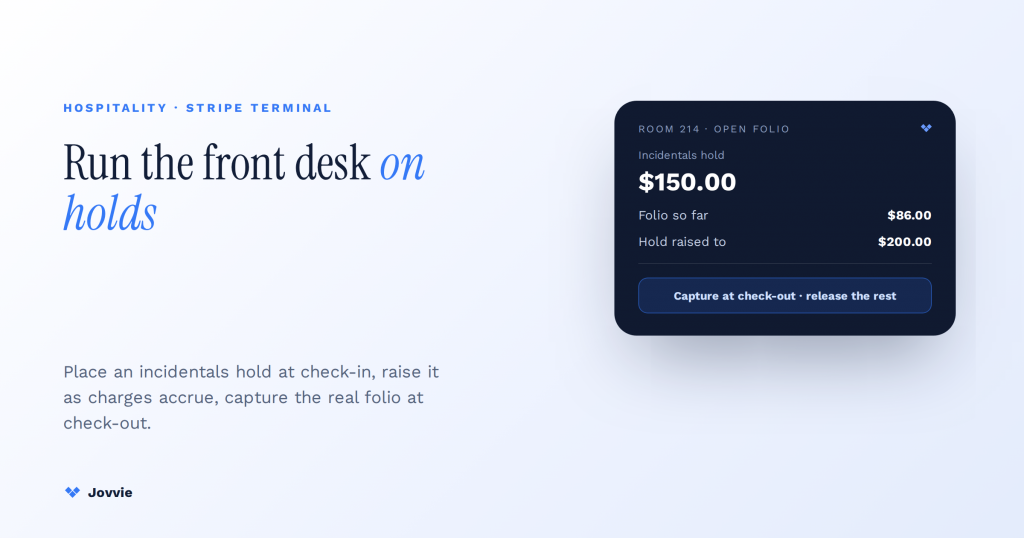
Yes — Stripe Terminal can run a hotel front desk. It handles the three things a front desk actually needs: taking payment at check-out, placing a pre-authorization hold for incidentals at check-in, and raising that hold as charges accrue during the stay. You place the hold with a manual-capture PaymentIntent at check-in, use incremental authorizations to increase it as incidentals add up, and capture the final amount at check-out — with a countertop reader like the Stripe Reader S700 at the desk or an S710 for mobile check-in. The part the enterprise case studies skip is how an independent or boutique property actually builds this without an Oracle OPERA contract. That’s this guide.
Key Takeaways
- Three jobs: check-out, hold, raise. Terminal takes the check-out payment, places an incidentals hold at check-in, and raises it with incremental auths as the folio grows.
- Terminal is the card engine, not the PMS. It handles every card interaction; pair it with a PMS, a Terminal-aware POS, or direct reconciliation to track the folio.
- Don’t over-hold at check-in. A modest hold raised only when a guest actually spends beats a $500 blanket hold that ties up their balance and generates complaints.
- Mind the ~2-day auth window. In-person authorizations are guaranteed about two days; for longer stays re-authorize or use incremental auths to keep the hold live.
- Boutique reader mix: S700 at the desk, S710 mobile. Every smart reader supports the incremental-authorization holds a front desk depends on — pick by form factor.
- One Terminal layer across the property. On WooCommerce with Jovvie, front desk, café, and gift shop share one processing account, reader family, and reporting surface.
We build Stripe Terminal deployments for hospitality operators, not from a whitepaper. Jovvie has shipped in-person payment flows for restaurants, bars, retail, and multi-location groups for eight years, and we run our own Stripe Connect platform at payments.bizswoop.app. So when Stripe’s own resources and the OPERA case studies describe hotel payments at the scale of a 400-room chain, we can tell you what the same mechanics look like for a 12-room boutique running a lighter stack. This is a cluster piece in our Stripe Terminal industry library — see the Stripe Terminal industry use-case guide for the parent pillar, and the restaurant and bar & nightclub siblings for the F&B side of a property.
Can Stripe Terminal run a hotel front desk?
Yes, with one caveat: Terminal is the card-present engine, not the property-management system — it takes the payments and holds the incidentals, but you run it behind a folio, whether that’s a PMS, a POS layer, or, for the smallest properties, direct reconciliation.
A hotel front desk needs three payment jobs done, and Stripe Terminal does all three:
- Take payment at check-out. A standard card-present capture — chip, contactless, or wallet — for the room and folio total.
- Place a hold for incidentals at check-in. A pre-authorization that reserves funds against the guest’s card without charging them, covering the minibar, room service, and damages.
- Raise the hold as the stay runs. Incremental authorizations let you increase the held amount when incidentals exceed the original hold, so you’re never under-covered at check-out.
What Terminal does not do is manage reservations, rooms, or the folio itself — that’s the PMS or POS layer’s job. So “can Stripe Terminal run a hotel front desk?” really means “Terminal handles every card interaction a front desk has, and you pair it with something that tracks the stay.” For an independent operator, that something can be a lightweight PMS, a WooCommerce-based property stack with Jovvie, or — for a handful of rooms — direct capture with manual folio reconciliation.
What a front desk actually needs: check-out payment, incidental holds, and folio reconciliation
A front desk’s payment surface has to do three distinct things, and most guides only describe the first — here’s all three, in the order they happen during a stay.
At check-in, the desk places a pre-authorization hold on the guest’s card for anticipated incidentals — a reserved amount that shows as pending on the guest’s account but is never captured unless spent. During the stay, as the guest charges meals, spa treatments, or the minibar to the room, the folio grows; if it approaches or exceeds the original hold, the desk raises the hold with an incremental authorization. At check-out, the desk captures the actual folio total — often less than the hold — and releases the difference.
Terminal maps to that lifecycle exactly: manual-capture PaymentIntent (hold), incremental authorization (raise), capture (settle). The next section walks the mechanics, because getting the hold lifecycle right is the difference between a front desk that runs smoothly and one that either under-charges or annoys guests with oversized holds.
Pre-authorization holds for incidentals: manual capture, the 2-day window, and incremental authorizations
You place an incidentals hold by creating a manual-capture PaymentIntent at check-in, which authorizes the card without charging it; you raise it with incremental authorizations as charges accrue; and you capture the final folio total at check-out.
Here’s the lifecycle in order.
The pre-auth lifecycle (step by step)
- Check-in — place the hold. Create a card-present PaymentIntent with
capture_method: manualfor your anticipated incidentals amount. The card is authorized and the funds are reserved, but nothing is charged yet. This is Stripe’s standard place-a-hold flow. - Mind the in-person authorization window. A card-present authorization is guaranteed by the network for a limited window — roughly two days for in-person payments — after which the hold may expire. For stays longer than that window, you re-authorize or lean on incremental authorizations to keep the hold live. Check current behavior in the auth-and-capture docs before you set desk policy.
- During the stay — raise the hold. When incidentals push the folio toward the held amount, use incremental authorizations to increase the authorized amount on the same PaymentIntent — no second card tap needed, because Terminal supports incremental auth on card-present holds. This keeps you covered without placing an oversized hold up front (which frustrates guests by tying up their available balance).
- Check-out — capture the real total. Capture the PaymentIntent for the actual folio total, which is usually less than the authorized amount. Stripe captures only what you specify and releases the rest. If there were no incidentals, you capture the room total; if the guest spent nothing, you can cancel the hold entirely and capture zero.
- Reconcile to the folio. Match the captured charge (and its Stripe metadata — reservation ID, room number) back to the folio so your books and the guest’s bill agree.
The independent-operator insight buried in there: don’t over-hold at check-in. A $500 blanket hold on every guest looks prudent but it ties up guests’ funds and generates complaints. Place a modest, realistic hold and use incremental authorizations to raise it only when a guest actually spends. That’s the mechanic the enterprise stacks automate and the connector pages never explain — and it’s entirely buildable on Terminal.
No-shows, cancellations, and deposits
Two edge cases decide most front-desk disputes, and Terminal handles both with the same primitives. For a no-show or late cancellation, if you placed a manual-capture hold at booking you can capture the agreed penalty amount and release the rest — you’re not charging the full stay, only your policy’s fee. For a deposit at booking (common for peak dates or event blocks), take it as a straightforward card-present capture if the guest is at the desk, or as a separate charge you later credit against the folio. The rule to hold onto: an authorization reserves funds and can be released cleanly, while a capture moves money and requires a refund to reverse. Choose the manual-capture hold whenever the final amount isn’t yet known — which, at a front desk, is almost always — so you keep the flexibility to capture the real total and release the difference without ever issuing a refund. That single discipline eliminates most of the chargeback and “why is there a pending charge on my card” conversations that plague desks running everything as immediate captures.
Which reader for the front desk: S700 vs S710 vs WisePOS E?
For a fixed front desk, the countertop Stripe Reader S700 is the default; for mobile check-in, poolside, or valet, the cellular S710; and the BBPOS WisePOS E is the budget handheld when you want smart-reader capability at a lower price.
| Reader | Best for | Connectivity | Form factor | Price (US) |
|---|---|---|---|---|
| Stripe Reader S700 | The fixed front desk | WiFi / Ethernet | Countertop smart reader with screen | $299 |
| Stripe Reader S710 | Mobile check-in, poolside, valet, pop-up desk | Cellular (built-in) | Handheld smart reader | $299 |
| BBPOS WisePOS E | Budget front desk or second station | WiFi | Handheld smart reader | $249 |
| Stripe Reader M2 | Lightweight mobile capture paired to a phone/tablet | Bluetooth to paired device | Pocket reader (no screen) | $59 |
| BBPOS WisePad 3 | Cheapest mobile card-present with PIN | Bluetooth to paired device | Pocket reader with keypad | $59 |
For a boutique or independent hotel, our recommendation is an S700 at the desk as the workhorse — it’s a self-contained smart reader that supports the hold and capture flows above and shows prompts on its own screen — plus an S710 cellular if you do mobile or express check-in, or run a desk where venue WiFi is unreliable. Skip the countertop reader entirely only if you’re a few rooms running check-in from a phone, in which case Tap to Pay or an M2/WisePad 3 paired to a tablet covers you. All the smart readers support the incremental-authorization flow that a hotel front desk depends on.
Running a boutique property without an enterprise PMS?
Jovvie drives Stripe Terminal holds and captures from a WooCommerce stack, so an independent hotel gets folio-connected incidentals without an OPERA contract.
Start your free trial →PMS integration patterns: native-on-Stripe, a Terminal-aware POS, or direct Terminal
There are three integration patterns for connecting Terminal to your property operations, and the right one depends on how much of a PMS you run: native PMS-on-Stripe, a Terminal-aware POS bridging to a folio, or direct Terminal with manual reconciliation for the smallest properties.
| Pattern | Who it fits | How it works | Trade-off |
|---|---|---|---|
| Native PMS-on-Stripe | Properties already on (or moving to) a PMS built on Stripe, e.g. Mews | The PMS drives Terminal holds and captures inside the folio automatically | Cleanest, but you’re committed to that PMS and its contract |
| Terminal-aware POS + folio | Independent/boutique running a lighter stack, or a WooCommerce property | A POS layer (like Jovvie) drives Terminal and syncs to your booking/folio system | Flexible and affordable; you assemble the stack |
| Direct Terminal + manual reconciliation | The smallest properties (a few rooms, a B&B) | Front desk runs holds/captures directly and reconciles to a simple folio or spreadsheet | Lowest cost; manual matching, best only at low room counts |
Enterprise properties land on the first pattern with OPERA or Mews. The whole middle of the market — the independent and boutique operators the case studies ignore — usually belongs in the second pattern, which is where a Terminal-aware POS earns its place: you get folio-connected holds and captures without an enterprise PMS contract.
Running a WooCommerce or Jovvie property: one Terminal layer for front desk, retail, and F&B
If your property already runs bookings, a gift shop, or food and beverage on WooCommerce, you can unify front-desk card-present payments, retail, and F&B on a single Stripe Terminal layer through Jovvie — one processing account, one set of readers, one reporting surface.
This is the angle the SERP misses entirely, and it’s a real advantage for independent operators. A boutique hotel is rarely just rooms — there’s a café, a shop, spa or activity bookings, maybe an events space. Run each of those on a separate payment system and you get separate reconciliations, separate rates, and separate hardware. Put them all on Terminal behind a WooCommerce-native POS and:
- The front desk places incidental holds and captures folios on an S700.
- The café or restaurant takes card-present payments (and tips) on the same reader family — see our restaurant guide.
- The gift shop rings retail sales through the same POS and inventory.
- Reporting rolls up across all of it in one place, at Stripe’s card-present rates, with the data staying yours.
That unification is exactly what an enterprise PMS gives a chain — and what independent operators are told they can’t have without one. On a WooCommerce stack with Jovvie, they can.
Frequently asked questions
Can Stripe Terminal run a hotel front desk?
Yes. Terminal handles check-out payments, incidental pre-authorization holds at check-in, and incremental authorizations to raise the hold during the stay. You pair it with a PMS, a Terminal-aware POS, or (for a few rooms) direct reconciliation to track the folio.
How do hotels place a pre-authorization hold for incidentals?
By creating a card-present PaymentIntent with capture_method: manual at check-in. This authorizes and reserves funds on the guest’s card without charging them; the hold is captured (in whole or part) at check-out, or cancelled if unused. See Stripe’s place-a-hold docs.
How long does a Stripe Terminal authorization hold last?
For in-person, card-present payments the authorization is generally guaranteed by the networks for about two days, after which it may expire. For longer stays, re-authorize or use incremental authorizations to keep the hold current — confirm current windows in the Stripe docs.
Can you increase a hold during a guest’s stay?
Yes, with incremental authorizations. As incidentals accrue, you raise the authorized amount on the same PaymentIntent without a second card tap — the recommended way to stay covered without placing an oversized hold at check-in.
Does Stripe Terminal integrate with a hotel PMS like Mews, Cloudbeds, or OPERA?
Through patterns rather than a universal plug: a PMS built on Stripe (such as Mews) can drive Terminal natively; otherwise a Terminal-aware POS bridges to your folio, or the smallest properties run Terminal directly and reconcile manually. Enterprise properties on Oracle OPERA typically use Stripe at scale, as in Stripe’s Staycity case study.
Which Stripe reader is best for a hotel front desk?
The countertop S700 for a fixed desk, the cellular S710 for mobile or express check-in and unreliable-WiFi environments, and the WisePOS E as a budget handheld. All support the incremental-authorization holds a hotel needs.
Build your hotel front desk on Stripe Terminal
If you run an independent or boutique property and want a front desk that places clean incidental holds, raises them only when guests actually spend, and captures the real folio at check-out — unified with your café, shop, and bookings on one Terminal layer — that’s what we set up. Start free, or book a hospitality consult and we’ll design the pre-auth flow, reader mix, and folio integration for your property size and stack.
Primary sources: Place a hold on a payment method, Incremental authorizations, Collect a card-present payment, Stripe hotel payment processing guide, and the Staycity + Oracle OPERA case study.
